
Contents
On October 21, PHP shipped emergency fixes for two flaws that researchers have nicknamed PHP2Shell (CVE-2026-109618 and CVE-2026-109619). Both are rated 9.2 out of 10. Put simply, a stranger can send a specially built request to a PHP website and, in the worst case, run their own code on the server. No password needed.
WordPress runs on PHP, and so do a large share of small business websites. WordPress.org put out its own notice: nothing in WordPress itself needs updating, but the PHP underneath it does.
We look after four WordPress sites on one server: a church here in Chilliwack, a kiteboarding school, a green building materials company in Baja California, and that company’s staging copy. This is what we did, in order. If you have a WordPress site and you are not sure whether anyone has dealt with this, the checklist at the end is for you, and if you would rather hand it off, that is what our WordPress care service is for.
Patching PHP
Each site runs in its own Docker container built from the official WordPress image. Before changing anything, we confirmed which PHP version each container was running and which image would deliver the fix.
We moved every site to the wordpress:php8.3-apache image, which had been rebuilt with the patched PHP 8.3.36, and recreated only the web containers. The databases were untouched, and WordPress itself, the plugins and all uploaded files live in separate storage, so the switch changed PHP and nothing else. Each site was down for a few seconds. The image tracks the latest PHP 8.3 release, so future PHP security fixes arrive the same way.
Checking for signs of a break-in
Patching closes the door. It does not tell you whether anyone tried it while the fix was on its way. One of the two flaws can also leak the contents of server memory without a full break-in, and memory can hold passwords and keys. So we checked:
| Check | Result |
|---|---|
| WordPress core files compared with the official copies | All four sites matched |
| Plugins from WordPress.org compared with the official copies | All matched |
| New administrator accounts | None |
| PHP files hidden in the uploads folder, new PHP files since the attacks began, odd processes | Nothing found |
| Server logs since the flaws were announced | Ordinary background scanning only |
All four sites came back clean. As a precaution against the memory leak, we changed every secret anyway (see below). If you want the longer version of how we keep secrets out of reach on our servers, we wrote about the server security stack most fast-moving teams skip.
Everything else we updated
With the sites open on the table, we took a full backup of each one, test-restored a backup to confirm it worked, and then went further than the PHP fix:
- WordPress and plugins. Every site got the latest WordPress security release, and every plugin from WordPress.org was brought to its current version, one at a time, with a homepage check after each.
- Switching off the feature the attack uses. Both flaws abuse a PHP feature called session upload progress, which WordPress sites do not need. We turned it off on all four sites as a second layer of protection, in case a variant of the attack turns up. The sites also no longer announce which PHP version they run.
- New secrets. Every site got new WordPress security keys and new database passwords. (Changing the keys signs everyone out, so if you are an editor on one of these sites, that is why you were asked to log in again.)
- Tidying up. We cleared out old migration files and backup copies that had no reason to stay on the live server.
- Detailed access logs. The server now keeps a full record of every request to each site, kept for 30 days, so any future question about who visited and when can be answered quickly.
- Security alerts. All site and security notifications now go straight to us.
The next morning: “the church website keeps going down”
At 15:25 UTC the following day, the alerts started. Our uptime monitor checks each site every minute, and it began reporting the church site and the kiteboarding site as down, back up, down again, for about two hours. The errors were a mix of timeouts and Cloudflare codes 520, 522 and 525.
We checked the server first:
- The site containers had not restarted, run out of memory or logged any errors.
- Every request that reached the server in that window was answered in under three seconds.
- The building materials company’s site, which runs on the same server but does not go through Cloudflare, had no alerts at all.
That last point settled it. Both affected sites go through Cloudflare’s proxy, and the unaffected one does not. The problem was on the road between Cloudflare and our server, not on the server itself. Cloudflare’s status page confirmed it: a major incident from 15:47 to 18:43 UTC, caused by one of their network providers failing between data centres in North America, and then failing again an hour later.
No changes were needed on our side. The sites recovered as soon as Cloudflare’s network did.
Is Cloudflare still worth it after an outage like that? For these sites, yes. The same morning, one address tried 20 passwords against the kiteboarding site’s login page and was locked out, and the church site sees a steady stream of these attempts. Cloudflare’s proxy hides the server and soaks up a lot of that noise. A couple of hours of flapping a year is a fair price.
What a free site check looks like
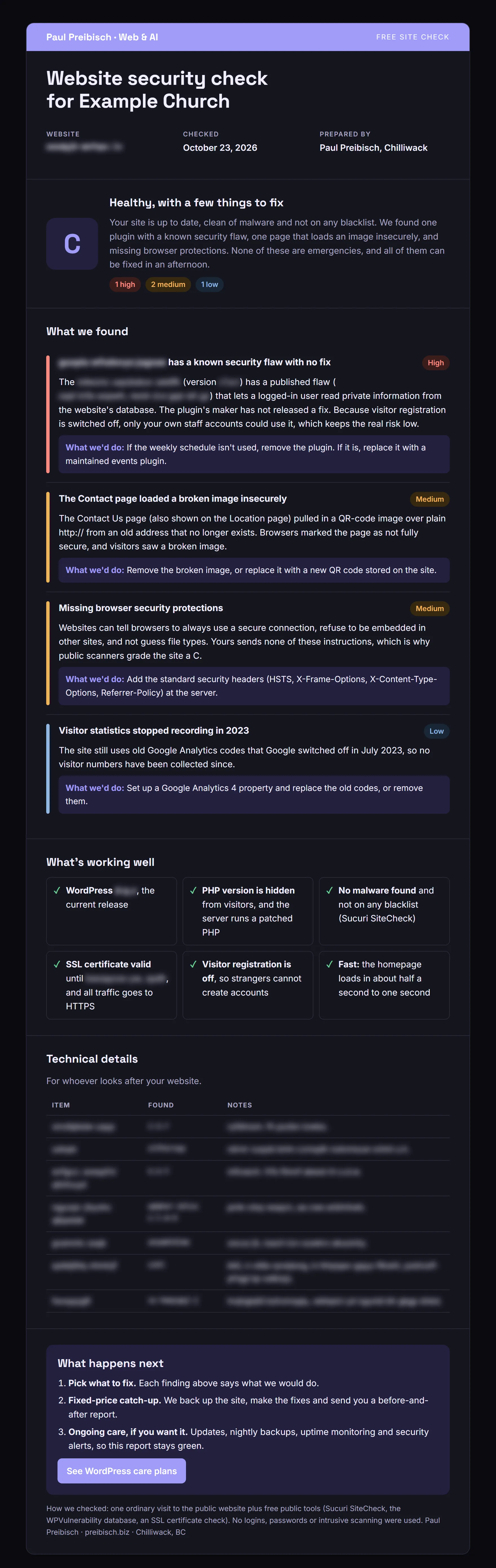
To show what a site owner actually receives, we ran our free site check on one of the sites we look after. The check only uses what any visitor can see: one ordinary visit to the site, plus free public tools like Sucuri SiteCheck and the WPVulnerability database. No logins, no passwords, no intrusive scanning.
Even on a site that was fully patched for PHP2Shell, it turned up three things worth tightening:
- A plugin whose maker has stopped fixing it. It has a published security flaw with no fix coming. The site wasn’t using it, so we removed it.
- A broken image loaded over an insecure connection on one page, left over from an old web address. We removed it, so the page is fully secure again.
- Missing browser security protections. These are the instructions a website gives the browser: always use a secure connection, don’t let other sites embed this one, don’t guess file types. We added them at the server.
Here is the report the owner would get. We swapped out the site’s name and blurred the version numbers and other technical details, so this page doesn’t hand anyone a map of the site:
We made all three fixes the same afternoon, after a fresh backup, and ran the same public checks again:
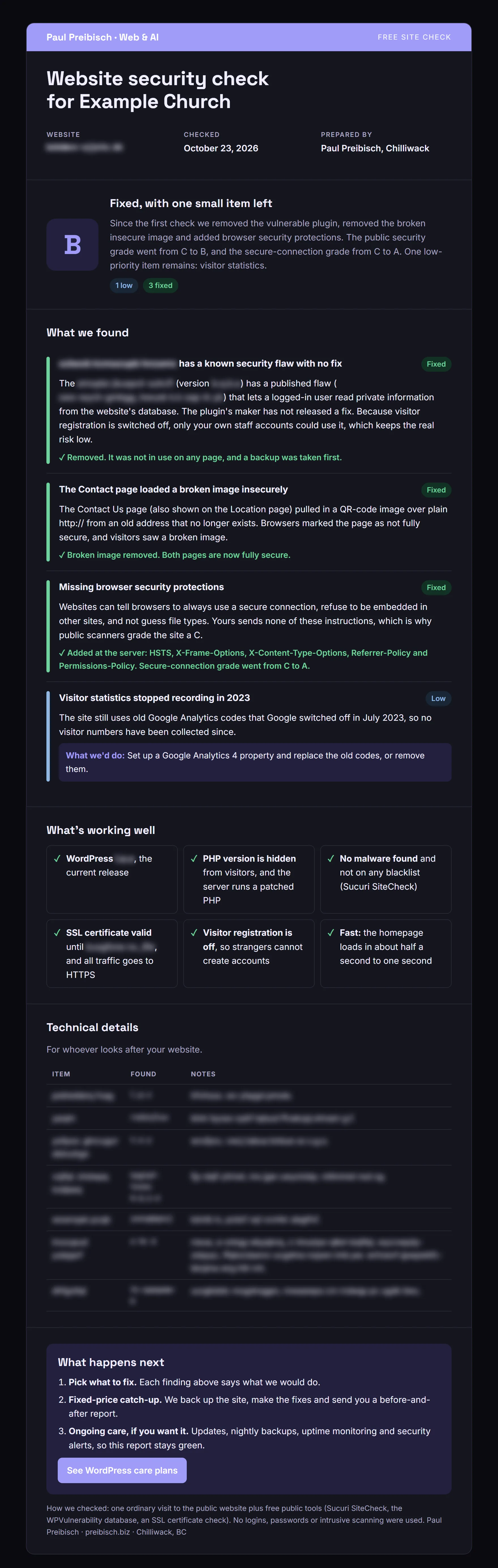
The one item left is visitor statistics. The site still carries Google Analytics codes that Google retired in 2023, so it hasn’t been counting visitors. It isn’t a security risk, just a blind spot, and it’s next on the list.
Why this matters for small businesses in Chilliwack
Most of the WordPress sites we see around Chilliwack and the Fraser Valley belong to people who are busy running something else: a shop, a trade, a church, a non-profit. Nobody is paid to watch for PHP security releases, and the site keeps working, so nothing looks wrong until the day it is. It is the same pattern we found when we set up AI tools for Loop and Links, a Chilliwack jewellery business: the owner is great at the business, and the technology quietly piles up behind them.
A checklist for your own WordPress site
If you run a WordPress site, or pay someone who does, ask these questions this week:
- What PHP version is the site on? For PHP2Shell, the fixed versions are 8.5.12, 8.4.27, 8.3.36 and 8.2.35. Anything older on those lines needs updating. If your site is on PHP 8.1 or earlier, it no longer gets security fixes at all.
- Where do PHP updates come from? Your host, a control panel, a Docker image? Confirm that source is still being updated.
- Are automatic updates on for plugins and for WordPress security releases?
- Is there a backup, and has anyone ever restored it? A backup nobody has tested is a hope, not a backup.
- Is the public web folder clean? Old copies of folders,
.bakand.zipfiles and database exports have no business being there. - Who gets the security alerts? Make sure they reach someone who will act on them.
- When something goes down, can you tell whether it is you or your provider? An uptime monitor, plus one site or service that takes a different path, makes that question quick to answer.
Want us to look after your WordPress site?
Everything in this post is what our WordPress security and maintenance service does for clients: PHP and plugin updates, malware checks, tested backups, uptime monitoring and Cloudflare protection. We are based in Chilliwack and work with businesses across the Fraser Valley in person, and anywhere else remotely.
It starts with a free site check. Send us your web address through the contact page and we will tell you which PHP and WordPress versions you are on, whether you are exposed to PHP2Shell, and what, if anything, needs doing. The time to do it is before the alert, not after.
Building something new instead? Our website development service builds fast sites that need far less of this kind of care.
Comments
Loading comments…
Leave a comment