

Contents
I’d like you to meet Denise Styler. She runs Loop and Links, a permanent jewellery business in Chilliwack, BC. Permanent jewellery has no clasp. Denise fits a fine gold or silver chain to your wrist or ankle and closes it on the spot. It stays on. She sells at local markets, private parties, bridal parties and weddings. Until recently, her whole online presence was one Instagram account and word of mouth.
We went to her place and sat down at her kitchen table with her MacBook. We spent the day turning that Mac into something closer to a business partner. Then we finished the job from my place over the next two weeks. This post lists everything we set up, in the order we did it.
Here is the short version. Her Mac now listens to her. It talks back. It keeps her passwords in a safe. And it drafts her Instagram and Facebook posts for her to approve. I now offer this setup as a service. You can read what is in it at the end.
Start with the business, not the software
The first hour had no installing in it. I interviewed Denise about her business and recorded it with Fireflies. Fireflies is the tool I use for every meeting I have. It listens, and at the end it gives me a full transcript and a short summary. Then comes the useful part. I hand that transcript to Claude Code and ask it to do more with it. What she sells, who buys it, which markets she works, who her suppliers are, how people find her: all of it came out of one conversation. Nobody had to type it twice.
Everything from that transcript went into a private dashboard on her Mac. She can open it at any time. I call it Project OS, and I set one up for every entrepreneur who works with me. It is one place for the marketing and business tasks that usually live in ten browser tabs. Hers shows the mission and goals of the business, a roadmap, a journal of everything we did together, who’s who, a whiteboard, her suppliers, and a map and calendar of the markets across the Lower Mainland.
Then I gave Claude Code a custom prompt to build that calendar. It lists every craft and artisan market across the Lower Mainland, with dates, organisers, and how to apply. I wanted this to be easy for her. She can see the markets. She can find out how and when to apply. And every market has a one-click Copy button that writes the application email for her. She can sign up herself, without waiting on me.
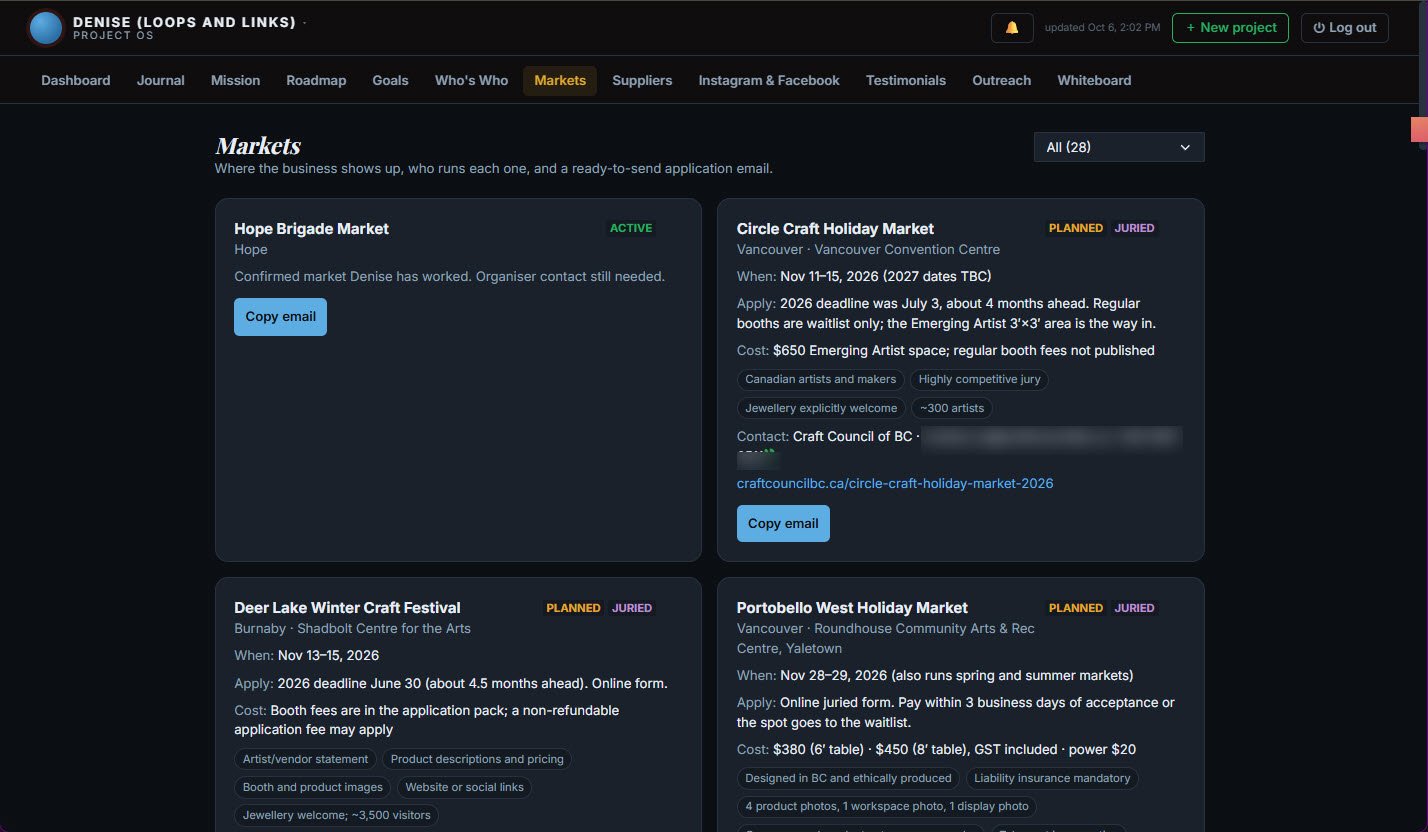
That is her Markets tab today. Fifteen researched markets across the Lower Mainland, twelve more leads to look into, and the one she already works. Each card shows when it runs, the application deadline, the booth fee, what the organisers ask for, and who to write to. Where Claude could not confirm a detail, the card says so, so she checks before she relies on it.
Claude also found the full contact details for both her suppliers. It wrote a one-page description of the business that she can give to any AI tool, so she never has to explain Loop and Links from scratch again.
That is the foundation. Every tool we installed after this knew which business it was working for.
A new way to work: talk to the Mac
Next, we changed how she uses the computer.
VoiceInk lets her talk instead of type. She speaks, and the words appear in whatever app is open, including Claude Code. Denise usually has her hands busy with a chain, and she thinks faster than she types. This was the biggest change of the day. Giving instructions to Claude became a conversation.
AgentVibes does the opposite. It is the free tool I built so that AI tools can talk back out loud. Now when Claude finishes a task, or needs an answer, it says so. Denise can be across the kitchen and still know what her Mac is doing. If you have not seen it, Agent Vibes: Finally, Your AI Agents Can Talk Back explains why I think voice is the missing half of working with AI.
Under those two tools sits the plumbing: the basic developer tools, a readable terminal, and Claude Code itself, set up with her business details. None of it is exciting. All of it makes the next two sections possible.
The passwords go in a safe first
Before we created a single social media key, we installed Infisical on her Mac. Infisical is a password safe of the kind large companies use. It runs on her own computer. Only her computer can see it. Nobody on the same Wi-Fi can reach it, not even at a coffee shop.
This is the unlock I spent a good part of AI Secret Sauce, Night Two on, and almost everyone skips it. Here is why it matters. The moment you connect an AI tool to a real account, such as Instagram, you get an API key. An API key is a long password that lets one program act on your behalf inside another. If that key sits in a text file, a chat window or a sticky note, it is a risk. If it sits in the safe, you can tell Claude “use the key called instagram”. Claude uses it, but never sees it, prints it, or saves it. Denise’s keys went straight into the safe. From then on, we only ever used their names. Nobody pasted a key into a chat.
While we were at it, Claude checked the Mac for settings that were open but did not need to be, and turned them off. The long version of why I work this way is in the server security stack you’re probably skipping.
Instagram and Facebook, through the front door
Loop and Links did not have a Facebook Page. Claude created one. It wrote the intro, the description and the story in Denise’s own first-person voice, using her own answers. Everything stayed a draft until she had read it and said yes. The Page is live now at Loop and Links on Facebook.
Then we connected both platforms the proper way, through the official doors that Instagram and Facebook provide for software. We asked for one permission only: posting. Both keys went into the safe. There is no program pretending to be her in a browser, and no outside scheduling company holding her login.
On top of that, I wrote her a custom Claude skill for posting. It works like this:
- Denise tells Claude she wants to post. Claude asks a few short questions: what the post is about, which photos, Instagram or Facebook or both, and when.
- She AirDrops the photos from her phone to the Mac. Claude picks them up and builds the post around them. If the post needs a graphic, Claude makes one.
- Claude opens a review page. It shows the post the way her followers will see it. She can change the caption, the platforms or the time, and leave notes. Each new version appears on the same page.
- When she says yes, Claude publishes or schedules the post, using the keys from the safe. Her approval is recorded. There is a limit on posts per day. And the posting tool has no way to edit or delete anything on her Page.
The first real post went out this way. It was built from two photos she AirDropped across the table.
The prompts she copies
Denise does not have to remember any of that. Her Project OS has an Instagram & Facebook tab with five ready-made prompts I wrote for her. Schedule a post. Post to Instagram now. Make a market announcement graphic. See what is scheduled. Check the connections. She clicks Copy, pastes the prompt into Claude, and Claude runs the interview, the review page and the final yes.
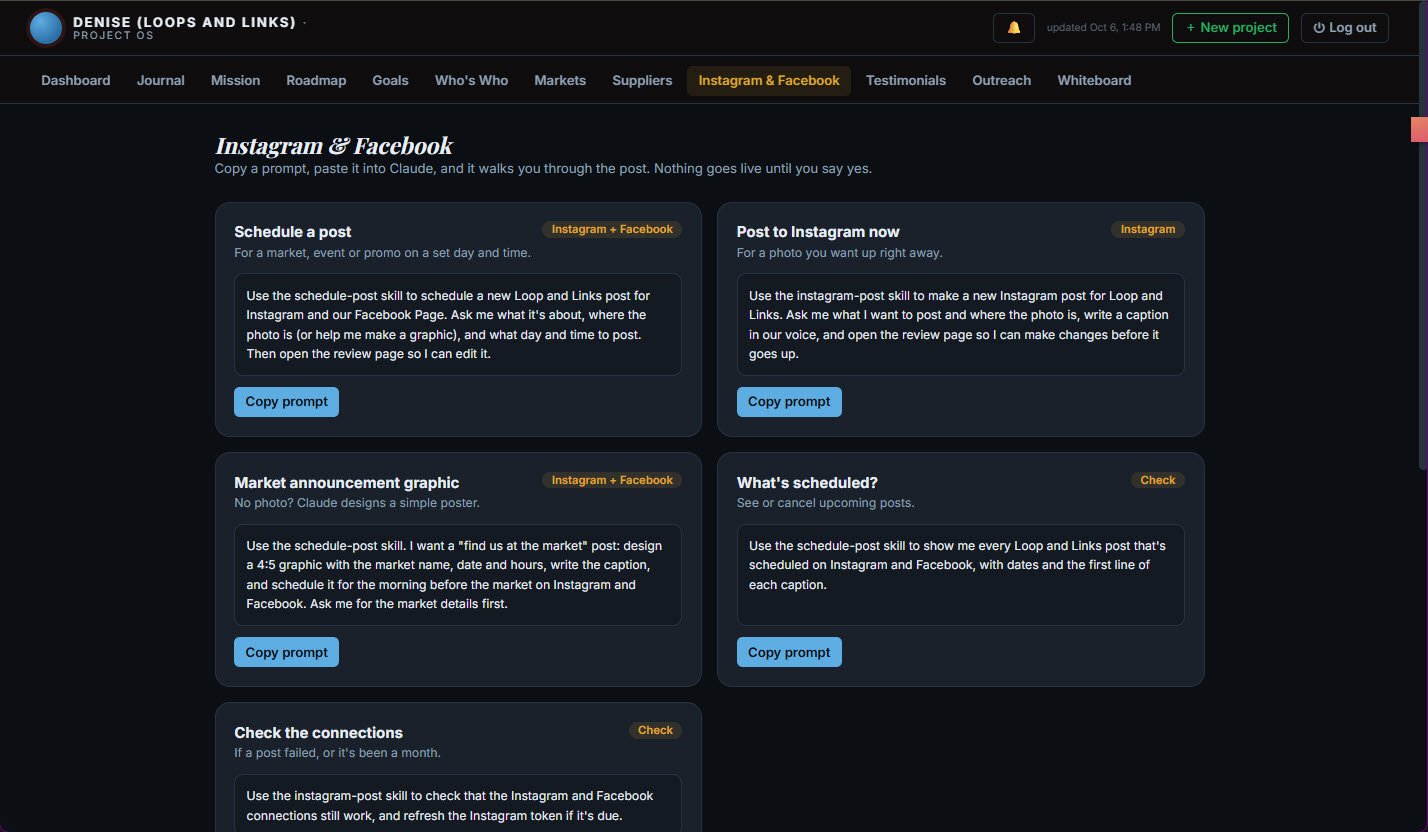
Each card says when to use it. The tab also carries the handful of facts worth knowing: Facebook holds scheduled posts itself, Instagram posts go out from her Mac, and when the Facebook key is due for renewal.
What changed for Denise
The honest answer is that we gave her a new way of working, not a new app. She says what she wants, out loud. The Mac does the research, the drafting and the posting, and talks back while it works. She stays the one who says yes. Social media used to be a second job that waited for a quiet evening. Now it is ten minutes after a market, with the photos still on her phone.
Everything we set up runs on her machine, under her accounts, with her keys in her safe. If I disappeared tomorrow, she would own all of it.
Done at the table, finished from a distance
The first day was in person. Everything after that was done from my place. A private, secure link connects her Mac and mine. With it, I could finish the Facebook posting tool, renew a key, brief her AI helpers and check on things. Denise only had to leave the laptop open. This is also how the setup works for anyone outside the Fraser Valley. A screen share replaces the kitchen table. The rest is identical.
Want this on your computer?
This is now a packaged service: Small Business AI Setup. Talk to your computer and have it talk back. Claude Code set up for your business. A proper password safe. Instagram and Facebook connected the official way, with a review-and-approve posting workflow. And a Project OS dashboard for the business. One setup day, in person in Chilliwack and the Fraser Valley or from anywhere by screen share, plus a follow-up session.
See the Small Business AI Setup →Each step makes the next one easy
Claude needs to know the business before it can write a post. Talking to the computer instead of typing is the new way of working in 2026, so we set that up early and used it for everything after. And the safe has to exist before the first key does. With those three in place, the Instagram part took an afternoon. It is the same lesson as Night One of AI Secret Sauce: get the plumbing right and everything else gets easier.
Thank you to Denise for letting me write this up. Go follow @loop_and_links. And if you are in Chilliwack, get linked up with someone you love.
Keep reading
- Small Business AI Setup: the service version of everything in this post
- AI Secret Sauce, Night Two: the presentation where the password safe gets taught live
- AI Secret Sauce: Foundations Class: passwords, bots and API keys, the plumbing under all of this
- Shipping Fast With AI? Here’s the Server Security Stack You’re Probably Skipping: the Infisical workflow written down
- Agent Vibes: Finally, Your AI Agents Can Talk Back: why your computer should talk back
- Nobody Ever Shows You AI. They Just Talk About It.: why I set this up at the kitchen table instead of describing it
Comments
Loading comments…
Leave a comment