
Contents
I thought this experiment was over.
Three videos into Marguerite, our AI-generated Halloween influencer, the Higgsfield balance read 2.65 credits. One eight-second clip had taken five takes and most of a monthly grant, and even on the cheaper video model a single reveal cost about a hundred credits. Fifteen costumes, two videos each? Not happening.
Then I reread my subscription page. Higgsfield’s plan came with unlimited image generation (Nano Banana Pro, Kling O1 Image and others) for the length of the subscription. Not unlimited video. Unlimited pictures. So we stopped making videos, made a lot of pictures, and let Claude Code turn them into videos.
The point was never one viral clip. It was to see whether a tiny team could run an influencer on a schedule of posts tied to something already trending, Halloween, long enough for the algorithm to notice. Follow along on Instagram, Facebook or Pinterest: a new costume posts every day until October 31st.
TL;DR for business owners
- Read your AI subscription page like a contract. Our “unlimited” perk was sitting there the whole time. It only worked in Higgsfield’s web app, not through the API, so we paired Claude Code with the Claude in Chrome browser extension. Claude Code wrote the prompts and ran the pipeline, and the Chrome extension drove Higgsfield’s website in my already-logged-in browser, clicking Generate on the unlimited plan all night.
- Stills plus a good voice beat video generation on cost. Twelve photos, a narrated script, captions and music make a 40-second reel that people watch. We voiced every line with Gemini TTS, which takes plain-language direction and cues like a pause or a laugh, so the narration sounds performed, not read. You don’t need a moving AI actor for every second.
- Make the AI check its own work against the picture. Our worst mistakes came from narration written from a plan instead of from the image.
- Anything you hard-code will repeat everywhere. One hat in a template showed up in fifteen videos.
- Approval first, then schedule. Nothing posts until I say yes.
That’s the glam vampire thrift haul, built entirely from stills. No video model touched it.
The workaround: a browser agent on an unlimited plan
The catch with the unlimited perk is that it only applies when you click Generate in Higgsfield’s website. Higgsfield’s own help center says it plainly: unlimited access applies only on higgsfield.ai, while the MCP connector and CLI use your plan credits. We learned that the hard way. When Claude Code generated images through the CLI, the same models quietly billed credits.
So Claude Code wrote every prompt, and Claude in Chrome fed them into Higgsfield’s website one after another, all night, eight jobs at a time. Each costume got:
- A thrift haul video: Marguerite and her friend Moreen shop for the pieces. 12 stills.
- A build video: she sews it, does the makeup, and reveals the look. 12 stills.
- Two Facebook “outing” photos: the two of them in full costume around Vancouver, at Stanley Park, Granville Island, Deep Cove and the Lynn Canyon bridge.
Fifteen costumes × 26 images = 390 stills, all done by late the next morning.
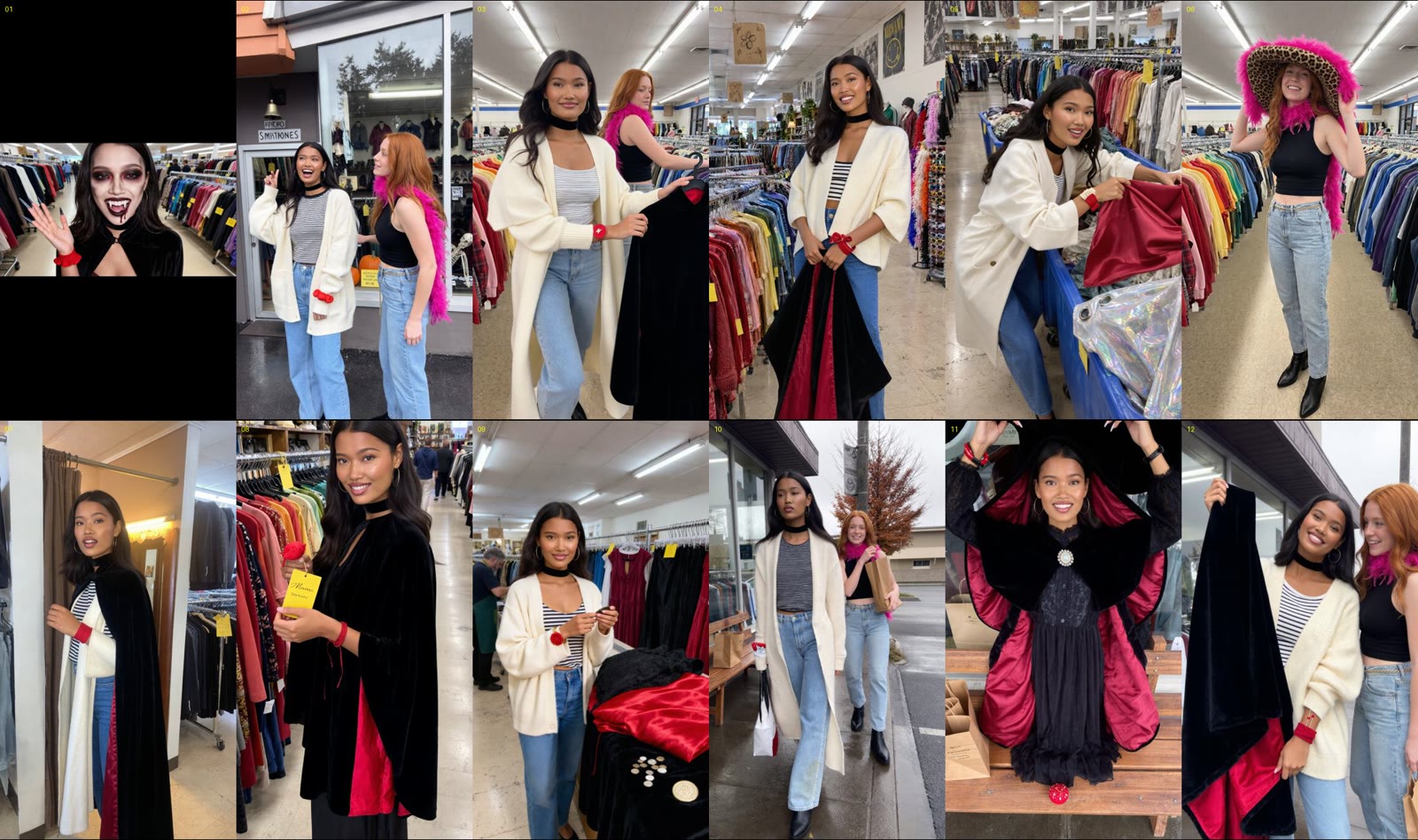
Twelve stills, one video. Notice Moreen’s leopard hat in frame six. We’ll come back to that hat.
What went wrong with the images
Marguerite showed up twice in the same photo. Some frames came back as two- or four-panel collages, some with a fake Instagram interface baked into the picture. The strangest lesson: telling the model “no collage” made more collages. Negative words prime it. What worked was saying what we wanted: “one single continuous photograph from one camera.”
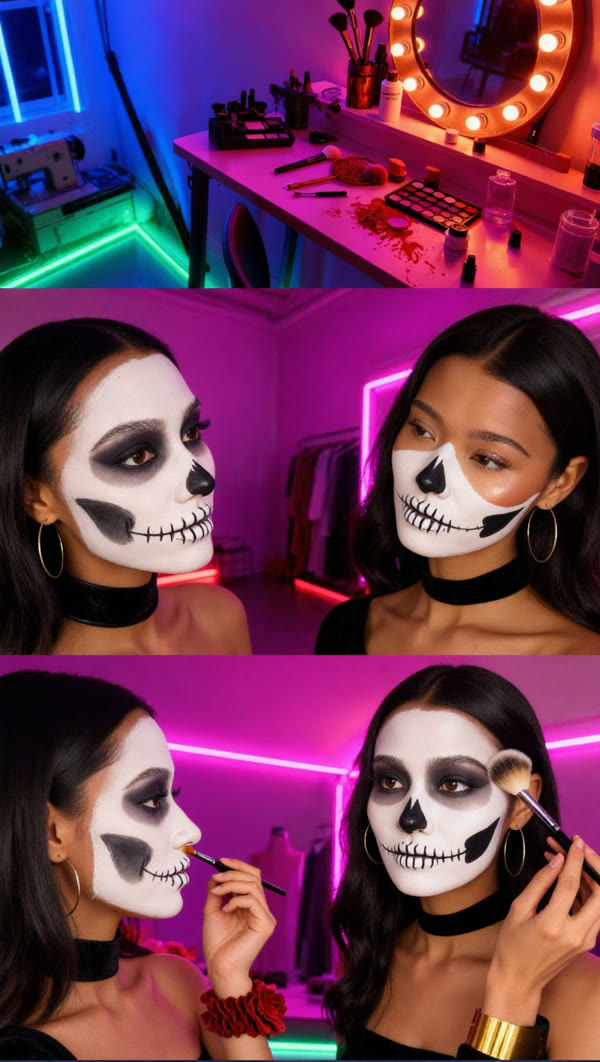
Rejected: one prompt, three panels, two Marguerites.
Higgsfield also silently ignores prompts over about 2,300 characters. Generate clicks, nothing happens, no error. Our long Facebook outing prompts were the ones that kept “failing.”
Making the words match the pictures
Claude Code built each video from the stills, one image per spoken line with captions, stickers and music. The first one, the Rumi costume from KPop Demon Hunters, was a mess in a very specific way. Claude wrote the narration from the storyboard, not from the images that came back. She said “trying it against myself” while just holding the jacket, and “Moreen found a hat” over Moreen holding a sweater. The price tag had no price. “My Rumi look” came out as “my roomie look,” which I thought meant her roommate. The picture-in-picture labelled “THE LOOK” showed Marguerite, not Rumi, and the text sat right on people’s faces.
Rather than fix those one by one, we made sure it couldn’t happen again, with a reusable Claude Code skill:
- Look first. For every still, Claude writes down what’s actually in it: who’s there, what they hold, whether it’s worn, and the expression.
- Then write the line. Lines and captions can only mention what the facts show.
- A validator blocks bad lines before any audio is made. A hat that isn’t in the shot, or a price with no sticker, and the build refuses to run.
- Face detection places the overlays. If there’s no clear spot, the overlay is skipped, never drawn over a face.
- The picture-in-picture shows the real character, or nothing.
That skill is why the next 28 videos took hours instead of days.
The hard-coding trap
A lot of the pain came from things we wrote once that quietly repeated everywhere:
- The leopard hat. One line in the shop template put it on Moreen in every shop video. Each costume now gets its own variations.
- The countdown. “Fourteen days to Halloween” was baked in, so when posting slipped a day, the line, caption and cover were all wrong. It now comes from the posting date.
- “Petite.” The model read Moreen’s “petite” as young, and some photos made her look like a kid. She’s now described as 25, the same height as Marguerite.
- The makeup. She had full makeup on while saying “just the makeup left.” Makeup now only appears from the makeup shot onward.
Every assumption in a template gets multiplied by however many posts you make.
Want this running for your business?
I set up Claude Code pipelines for small businesses: content made from your own photos, voiceovers, a review-and-approve tracker, and scheduled posts to Facebook, Instagram and Pinterest. It's also what we teach in the AI Secret Sauce class at Cowork Chilliwack.
Work with me →The dialogue and the voices
Claude wrote every word of the dialogue, all thirty videos, and honestly we were impressed. But the first drafts sounded like a brand talking, not two friends. We wanted it believable, so we had Claude research how people in their twenties actually talk and joke with each other, then redo the dialogue as podcast-style banter: sarcastic, a bit cynical, with Vancouver jokes. Moreen stopped being a silent sidekick and got lines of her own.
Then Moreen needed her own voice. Both women started out sounding alike, so we rebuilt Moreen’s voice lower and raspier against Marguerite’s bright, high one. One batch went wrong and dragged Marguerite’s voice down too, until I couldn’t tell who was speaking. Now every build measures both voices’ pitch and flags them if they drift together.
Every line is voiced with Gemini’s text-to-speech. We’d moved off Fish Audio because Gemini takes plain-language direction straight from the terminal, no copy-pasting.
Quotas are real. Our Gemini tier allows about 100 voice requests a day per model, so the pipeline falls back to a lighter model, then to Fish Audio’s website through Claude in Chrome.
The tracker, the thumbnails and the schedule
Claude Code builds one tracker page: every post until Halloween, with its picture, caption and status. Click a thumbnail and the reel plays full screen. That’s where I approve things. Nothing is scheduled until I’ve watched it.
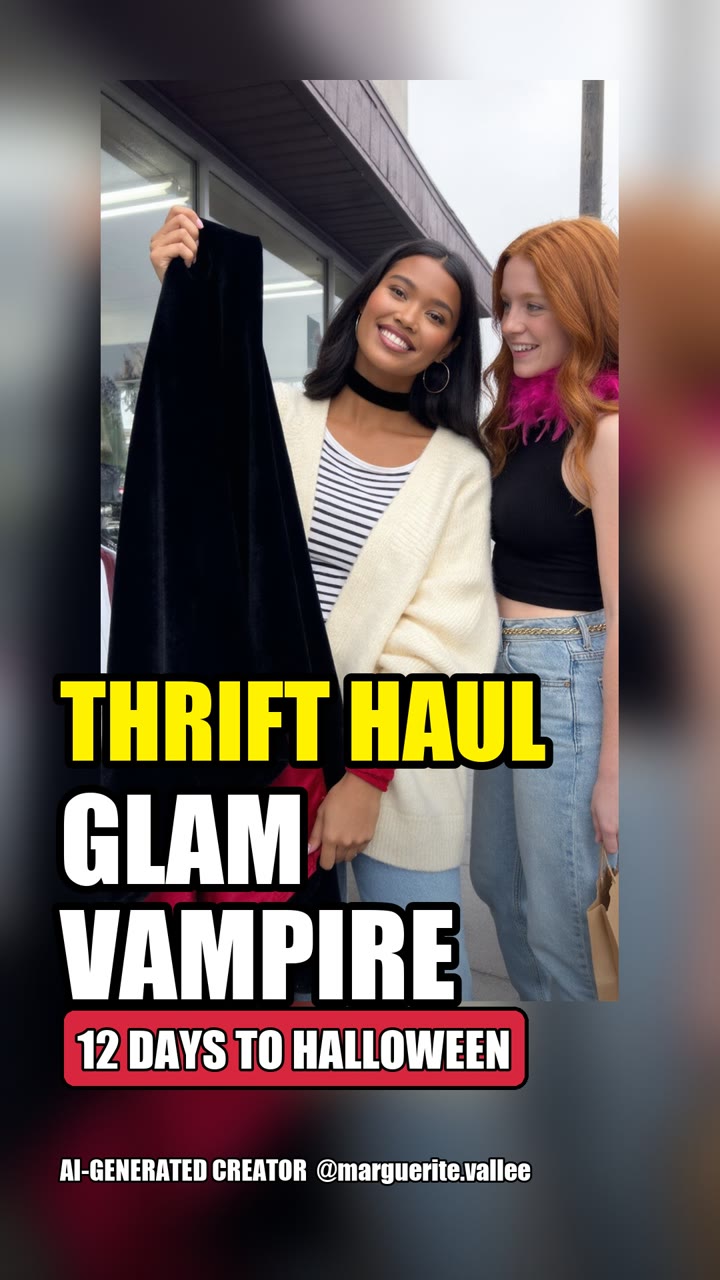
Thumbnails get big text, a countdown and an AI label, placed so they never cover a face.
Posting runs through the Meta Graph API. Facebook schedules natively; Instagram’s API doesn’t, so a small timer on our server publishes each reel at its slot. Each caption has a question (“Which costume should be #15?”), a like-and-follow ask, a real location tag (Coal Harbour, Deep Cove, Granville Island, Stanley Park) so locals see it, and an AI disclosure.
Pinterest is the slow burner. “DIY Halloween costume” searches peak in late October, and a pin keeps sending people for weeks. Each costume gets two pins on her 16 Halloween Looks board.
Music was supposed to come from Sunny, our Rakazo bot, generating tracks in Suno. She got stuck on Suno’s login, so I made the track myself in five minutes. Not everything has to be automated.
What a small business can take from this
Swap “Halloween influencer” for your bakery, dance studio or hardware store. Ride a moment people already search for, with a daily countdown. Build one recognizable face, a mascot or a staff member, and lock its look. Make stills, not videos. Let a browser agent use the tools you already pay for. Approve everything in one tracker, then schedule it to Facebook, Instagram and Pinterest from Claude Code. And be upfront that it’s AI: labelled accounts get recommended, unlabelled ones get buried.
The results
Ask me on November 1st. The follower count, saves and comments go in the wrap-up post either way. What I can say now: three videos used up a month of video credits, and the stills approach got us thirty more without buying a single extra credit, plus thirty outing photos and a month of scheduled posts.
Watch it happen on Instagram, Facebook and Pinterest. Got a favourite costume? Tell her in the comments. She answers every one.
Keep reading
- Meet Marguerite: We Built an AI Influencer to See If She Can Hit 21,000 Followers by Halloween: how she was built and what we’re aiming for
- Five Takes for Eight Seconds: What Directing an AI Actor Actually Costs: where the credits went
- The Reveal That Cost $9 Instead of $27: the cheaper-model pivot, and why a transcript isn’t a review
- Meet Rae: The AI Strategist Who Rewrites Every Script Before It’s Shot: the viral-video persona behind the scripts
- We Tried Building an AI Team on Grok. Here’s Why We Moved to Self-Hosted Rakazo Instead: the bot platform behind her accounts
Comments
Loading comments…
Leave a comment