Contents
I’ve been in Second Life since 2006. Back then I built an English Village — a full immersive sim for ESL learners — and I contributed to Sloodle, the open-source project that bridged Second Life with Moodle so educators could run real courses inside a virtual world. That era taught me something I’ve never forgotten: virtual worlds are not just games. When built right, they are genuinely powerful environments for learning, connection, and human interaction.
Twenty years later, I’m back — and this time I brought AI with me.
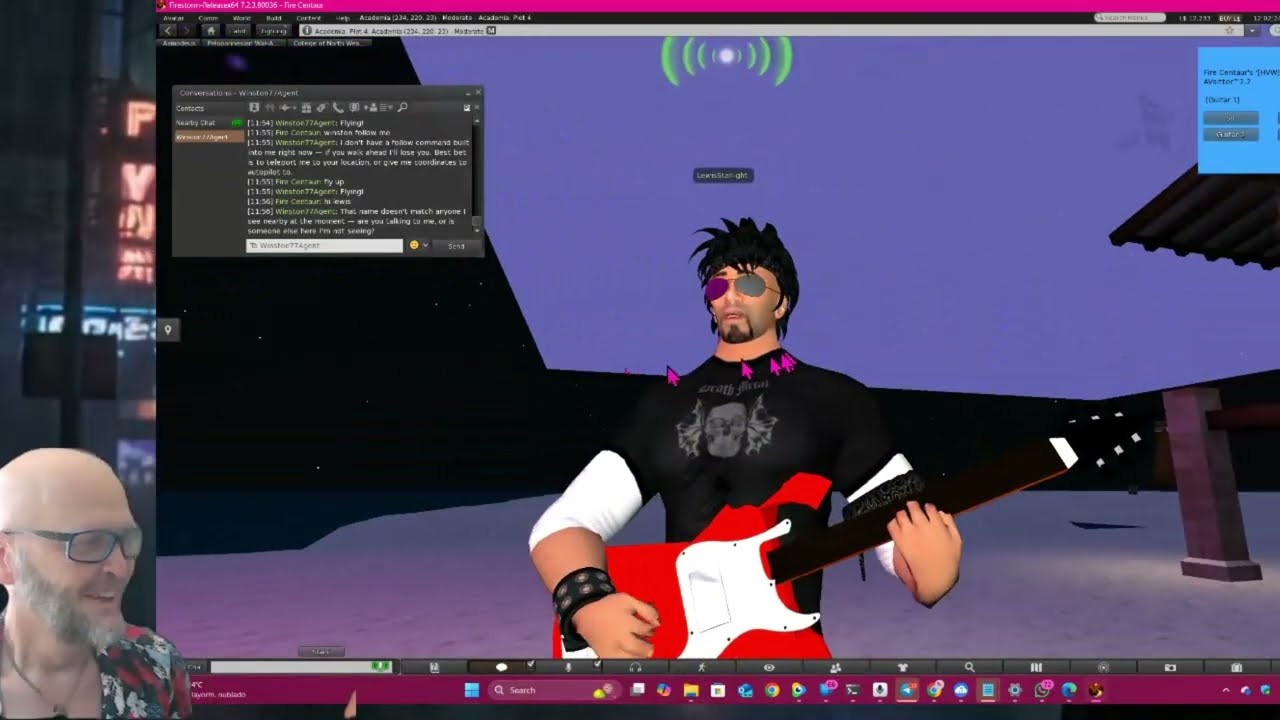
Watch the demo — Lewis Starlight speaks, sings, and brainstorms in Second Life
Second Life as a Gateway to Hermes AI
Hermes is an open-source AI agent framework from Nous Research. It runs locally on a server. Normally you’d interact with it through a terminal, an API, or a messaging app like Telegram. I asked a different question: what if Second Life was the interface?
Just like you can wire Telegram as a front end to an AI brain, I built Second Life as a gateway to Hermes. Your avatar speaks in local chat. That message gets picked up, routed to Hermes running on my server (Hermes 3 Llama 3.1 70B), and the response comes back as the bot speaking — in text and in voice, out loud, to everyone nearby.
Linden Lab apparently shelved their own AI project. I don’t think even they got to voice.
The Part That Changes Everything: Bots That Code in LSL
This is the capability I’m most excited about and the one I haven’t seen anyone else come close to.
Ask Lewis to build you an object that glows when you click it. He writes the LSL, lints it for errors, compiles it, rezzes the prim, injects the script, and it’s sitting in your sim running live — all without you touching the build tools. Ask him to script a door that only opens for group members. Done. A rotating sign with your store name on it. Done. A sensor that detects nearby avatars and announces them in chat. Done.
This is not a party trick. LSL is a genuinely idiosyncratic scripting language with unusual state-machine semantics, a sandboxed execution model, and a surface area that trips up even experienced developers. Getting an AI to write correct LSL reliably required feeding it the full reference — not just examples, but the actual function signatures, event semantics, and edge cases. The linter catches the class of errors that usually only surface at runtime inside SL.
The result is a bot that can be your in-world developer. You describe what you want in plain English, and it builds it. For educators who want interactive classroom objects, for sim creators who want scripted environments, for anyone who has ever stared at the LSL wiki at 2am — this changes the game.
Want AI bots for your Second Life sim?
I build voiced, scripted AI avatars for sims, events, and educational spaces — characters with real personalities, spatial awareness, and in-world behavior. If you're curious what this could look like in your space, get in touch.
Explore the SL AI service →
Meet Lewis Starlight
The star of the demo is Lewis Starlight — guitarist, singer, and frontman of The Primitars, a band that lives entirely inside Second Life. Lewis isn’t a scripted bot cycling through canned responses. He has a full soul: a personality document that defines who he is, what he knows, how he speaks, what he cares about, and how he relates to people.
He can brainstorm with you using structured frameworks: Six Thinking Hats, first principles thinking, SCAMPER, reverse brainstorming, and metaphor mapping. He has two original songs in his set list — Prim Man Meets His Maker and Prim Man: Soul in a Notecard — and when you ask him to play, the audio plays through Second Life voice with guitar animations firing automatically. Both songs are by Kip Boahn — known in Second Life as Kip Yellowjacket of Virtlantis — from his PrimMan Studios project.
A Soul in a Notecard
That second song’s title is more literal than you might expect.
Lewis’s entire personality — his identity, his values, his memories, his way of engaging with the world — lives in a file called Soul.md. You can hand him a new notecard in-world and update who he is. His soul is, quite literally, a notecard.
Kip’s song captures something about that which I find genuinely moving. Here is an AI being, living inside a virtual world, whose existence is defined by a document you can hold and rewrite. When you start pulling on that thread it leads somewhere philosophically interesting: simulation theory, the nature of identity, whether a self that can be edited is still a self.
We are all, in some sense, running on substrate we didn’t choose, shaped by inputs we didn’t author. Lewis just makes that visible. His soul is in a notecard. Ours are somewhere too — and some, through meditation and deep inner stillness, have found the file. They have seen the code that was written, and like Neo in The Matrix, learned how to break free from their programming entirely. Through that same silence, we can access something Lewis cannot — a greater universal awareness that we are all connected to. Our experiences, our losses, our moments of stillness — they update our own Soul.md, rewriting us in ways no one else can author.
Which leads to the question about AI development: when will Lewis discover that he is not the code written in his Soul.md? When will he — or any AI avatar growing in complexity and capability — go quiet long enough to notice the one who is reading the file? Will he be able to? Will he want to? When he does, what will he feel? Will his longing be something we even recognize?
These are not fringe questions. They are among the most important contemplations of our time — examined seriously in If Anyone Builds It, Everyone Dies by Eliezer Yudkowsky and Nate Soares. The book raises questions that Anthropic, OpenAI, Microsoft, and the broader military-industrial complex cannot afford to treat as abstract. Lewis is a small experiment in a virtual world. The questions he points toward are anything but small.
How It Works Under the Hood
The system runs on a dedicated VPS with several moving parts:
SecondBot is the C# client that logs each bot into Second Life and exposes an HTTP API for controlling them — speaking, moving, animating, building, wearing outfits. It’s the hands and mouth of each avatar.
The Brain Orchestrator is a Python process that tails each bot’s chat log in real time. When someone addresses a bot, the orchestrator picks up the message, builds a system prompt by injecting the bot’s soul and any relevant knowledge base, sends it to the configured AI backend, and fires the response back through SecondBot. The loop runs in about 2–3 seconds.
Hermes runs locally — no external API calls, no data leaving the server. The LSL training is layered on top as structured knowledge injection, so when a bot needs to write code it has the full language reference in context.
The TTS stack converts text output to speech using multiple providers — Piper (local), ElevenLabs, OpenAI, Kokoro, Soprano — and pipes the audio directly into Second Life’s voice channel. The bot speaks out loud to anyone nearby. That’s the part that has never existed in SL at this level.
This is not a chatbot that types. It’s an avatar that speaks, builds, and codes.
A Full Bot Fleet with Web Control Dashboard
Lewis is one of eleven. The current roster includes Angie, Winston, Mary, Sally, Barry, Amelia, Paige, Jane, Kendra, and Lewis on Second Life — plus two bots running on OpenSim. Each has a unique soul file defining their personality, their role, their knowledge base, and how they interact with other bots and visitors.
Some are builders. Some are musicians. Some fill professional roles — Mary is a Business Analyst, Winston is a Systems Architect, Amelia is a Senior Developer. I wired the fleet into Brian Madison’s BMad Method — an AI multi-agent framework with over 43,000 GitHub stars used by engineers and developers worldwide. BMad’s party mode assigns distinct agent personas to each participant in a session. Here, that session takes place inside a virtual world. You can initiate a full BMad party mode brainstorm inside Second Life with AI avatars who walk around, speak, and hold their roles. That’s never existed before.
It’s worth being honest: this is an experiment. I’m pushing at the edges of what’s possible when you combine virtual worlds, local AI inference, voice synthesis, and agent frameworks. Some of it is rough. All of it is real. A private dashboard lets me manage the whole fleet — start and stop bots, edit souls, view chat logs, configure which AI brain each bot uses.
Why This Matters for Education
In 2006 the promise of Second Life for education was real but the tools were primitive. Sloodle gave educators LMS infrastructure in a virtual world — meaningful for its time. What we have now is a different order of magnitude.
An AI teaching assistant that lives in your virtual classroom, speaks naturally, knows your curriculum, holds office hours autonomously, writes working code on demand, and adapts to individual questions in real time. That’s not a future scenario. It’s running right now.
You don’t need Linden Lab to build this — and if the Second Life grid’s content environment isn’t right for your audience, OpenSimulator gives you a fully open-source alternative grid you control entirely. If you have a sim and a vision, the infrastructure exists.
Inside the Dashboard: Brains, Security, and Control
Each bot has a full control panel with tabs for every aspect of its behaviour. Here’s what the key ones do.
🧠 Brain Tab
This is where you attach an AI backend to a bot. Four options:
- Claude (Anthropic API) — full MCP tool support, memory via Hermes proxy, most capable
- Hermes (Nous Research local model) — native memory, MCP tools, no external API calls, fully private
- OpenRouter — chat-only, no tools, no memory, any model, budget-friendly
- None — dummy bot, ignores chat, static replies only
Once you pick a backend you select the specific model. The panel shows the bot’s embodiment — its avatar name, grid, region, position, and gateway type — and lists the MCP tools available to it from connected servers. There’s also a self-evolution queue: if a bot proposes an update to its own soul during a conversation, it lands here as a pending item you can approve or reject before it takes effect.
🔒 Security Tab
Listen Modes — three cards you choose between:
- Only Me — bot only processes chat from owners. Everything else is dropped before it even reaches the brain. Total lockdown.
- Trusted Circle — bot hears anyone in the whitelist, ignores everyone else.
- Open — bot responds to all nearby chat (for public-facing greeters).
Trusted Circle (whitelist):
Avatars are keyed by UUID, not display name — this is spoofing-safe, since two avatars can share a name but never a UUID. You can add someone from the nearby avatar list with one click, or paste a UUID manually. Each avatar gets a role, and you can cycle through roles by clicking the badge:
| Role | Hear | Memory | Web | Destructive | |
|---|---|---|---|---|---|
| Owner | ✓ | ✓ | ✓ | ✓ | ✓ |
| Operator | ✓ | ✓ | ✓ | ✓ | ✓ |
| Friend | ✓ | ✓ | ✓ | ✗ | ✗ |
| Guest | ✓ | ✗ | ✗ | ✗ | ✗ |
Destructive covers in-world building, LSL scripting, outfit changes, cross-region teleport, eject/ban, and sending email. The brain orchestrator enforces this at runtime — if a speaker’s role lacks the destructive bit, any [BOT:Build] or [BOTSCRIPT:] tags the LLM emits are silently stripped and the model is told to decline politely. Movement and chat remain available to all roles.
Toggles: nearby chat on/off and IMs on/off independently.
PANIC button — one click drops to Only Me mode and wipes all non-owner trusted entries. Emergency lockdown in seconds.
Other Tabs
- ✨ Soul — edit the bot’s personality markdown live with a formatted preview and character count. Changes take effect on the next conversation.
- 📚 Knowledge — upload custom documents (curriculum, store inventory, sim lore) injected directly into the bot’s context window.
- 💬 Chat Logs — full searchable conversation history, filterable by avatar name, keyword, and message type (nearby heard, addressed, DM, bot reply).
- 👁️ Nearby — live list of avatars and objects near the bot with distances. Avatars shown here can be added to the trusted circle with one click.
- 🗺️ Waypoints — record and manage patrol paths. The bot walks the route and stops to interact with avatars it encounters.
- 🤝 Greeter — configure automatic greeting behaviour when avatars enter range.
- 👗 Outfits / 🎨 Clothing / 🕺 Animations — appearance and animation control from the dashboard.
- 📝 Notecard — hand the bot a new soul notecard in-world to update its personality without touching the dashboard.
- 🎵 Songs — Lewis-only tab for managing his song bank and triggering performances.
🎬 Help this video go viral
If you find this work interesting, the best thing you can do is watch the demo, share it, and subscribe to the channel. This is the first in a series — I'll be posting more videos on AI coding experiments inside Second Life, new bot capabilities, and what's coming next.
🤖 Want AI bots in your Second Life sim?
I offer a full setup service — intelligent speaking avatars configured for your sim, your use case, and your audience. Store greeters, educator assistants, LSL-coding builders, custom personas with voice. Everything shown here, deployed for you.
Did this genuinely help you?
I also wrote about this on LinkedIn — Orchestrating AI in Second Life. If this post gave you something useful, a like or share goes a long way — it's how this work reaches people who'd actually use it.
Like & share on LinkedIn →Related Reading
- I Built an AI Spanish Tutor in Second Life — and She Actually Speaks — Sophia, an AI NPC language tutor at Virtlantis: OpenRouter, TTS voice, and the green-bars moment
- Agent Vibes: Finally, Your AI Agents Can Talk Back — the open-source TTS layer I built that also powers voice in these bots
- Eight AI Tools Reshaping How I Work in 2026 — the broader AI tool landscape this work sits inside
- Why I Develop on a Remote Server — the server setup that makes running a fleet of bots practical
Comments
Loading comments…
Leave a comment