TOP SECRET
Case File · Night Three
AI SECRET SAUCE
Night Three: Talk to Claude. Let It Drive.
FOR
Local entrepreneurs, Chilliwack
OPERATION
Night Three · Hands-on
DATE / TIME
Tuesday, October 13 · 7:00 to 9:00 PM
CLEARANCE
BRIEFED BY
Paul Preibisch
EYES ONLY · THE PASSWORDS IN THIS FILE NEVER LEAVE THE SAFE
Where we are
Nights One And Two, In A Minute
Night one · Sept 28
Meet Claude Code
- A real event that grew to 82 people with no ads, and the tools behind it
- The five unlocks: what AI can do for a business
- Installed Claude Code
- Saw one real working bot (a WhatsApp checker) built from a plain request
- Email: Claude reads and drafts, you send. Claude holds a badge for one door, never your master password
Night two · Oct 5
The safe
- A tour of Claude Code: chat and code modes, project folders, models
- Voice: VoiceInk to talk to your computer, AgentVibes so Claude talks back
- Docker, then Infisical as your safe, locked to your laptop, with your first secrets stored
- BMAD: a team of AI agents with different roles
- Mapped the room-booking problem, and Claude drafted the automation plan
Tonight, night three: put it to work. Claude drives your apps, and we automate the room bookings.
Quick check: who still has their safe running from night two?
New mindset
Use Plain Words, Not The Maze
Messages: top bar
Feed and stories: the middle
Settings: hidden under your photo
Calendly
Its own left-hand menu
Event types, meetings, availability, integrations
None of it where LinkedIn keeps things
Zapier
Another layout again
Zaps, tables, history, connections
Different words for the same ideas
Eventbrite
Yet another menu again
Events, orders, reports, marketing
Your event page lives in a different spot again
Every website has its own maze: its own buttons, in its own places, with its own words. They move things around every few months. New mindset: use natural language, and get Claude to navigate it. Claude is your navigator.
Raise a hand: which app do you dread opening?
New mindset
The New Way: You Talk, Claude Drives
The old way
You learn each site's menus and click through them yourself.
LinkedIn → Calendly → Zapier → Gmail → Stripe … five mazes, one tired person.
The new way
You say what you want, in plain words. Claude is the commander: it goes into each app and does the clicking for you.
You stay in one place. The apps are just where the work gets done.
You
→
Claude Code
→
Calendar
Gmail
Zapier
Stripe
Your server
Your job: say what you want, and say yes or no to the plan.
New mindset
Two Ways In: Connector Or API Key
Connector
A ready-made door. You click Allow and sign in on the app's own page. Google Calendar, Gmail, Drive and Zapier work this way. It uses a standard called OAuth.
Claude never sees your password. You can switch it off any time.
API key
A long password made for software. You copy it from the app and hand it over. For apps with no connector, or when Claude works from a server.
EXAMPLE ONLY, NOT REAL
sk_live_51Hx9QaB7vK2mPz4RtY8nWc3LdE6
The difference: with a connector (OAuth) the app gives Claude a limited pass that you can cancel. With an API key you hand over a secret that works like your whole login until you delete it.
Connectors where they exist. Keys where they don't, and keys go in the safe.
New mindset
Keys Live In The Safe. Claude Gets The Name.
1
You put the key straight into the safe, never into the chat
2
You tell Claude only its name: hetzner-api-token
3
Claude asks the safe for it, uses it, and never shows the value
Why we use Infisical · 3 advantages
1. Key rotation. Change a key once in the safe and every Zap and agent gets the new one. No hunting through apps.
2. One key at a time. When Claude needs something, it asks for that single key, not the whole vault. Each agent gets only what its job needs.
3. A record. Every read is logged and every change is versioned, so you can see who used what, and roll back.
The 1Password CLI does the same job, with one differentiator
It is built around a person. You unlock it with a fingerprint or password, which is great for people. Infisical is built for unattended agents: free, on your own server, handing keys to machines at 2 am with no person to unlock it.
The rule: if you can see the key on the screen, it is already in the wrong place.
Tonight's objectives, in order
You Leave With Five Things Done
1
The new workflow: you talk, Claude drives the apps
Your new workflow
2
Claude connected to your calendar, mail, files and Zapier
Connectors
3
A demonstration of room booking automation: no booking lands on top of another
Takeaway
4
Rental requests that arrive with a hold and a draft reply
Phase 2
5
The whole booking system, all five phases, built and tested
The full plan
Handout: scan the QR on the next slide. Every prompt in it has its own QR code.
Connect Claude · connectors
Give Claude A Window Into Your Apps
You do yourself
In the Claude app: Settings → Connectors. Add Zapier, Google Calendar, Gmail and Google Drive. Sign in to each with the Google account that owns the room calendar.
Then start a new chat so Claude sees them.
Then say or paste · looks, changes nothing
Look at my Google Calendar, Gmail, Drive and Zapier. Find the meeting room calendar, the Zap that books members today, and my room booking spreadsheet. Tell me what you found. Don't change anything.
Copy prompt
Zapier
Calendar
Gmail
Drive
It worked if Claude names your room calendar and the Zap that books members today.
The solution, start to finish
The Whole Plan In Six Minutes
▶ The whole plan
5 min 48 · click for full screen
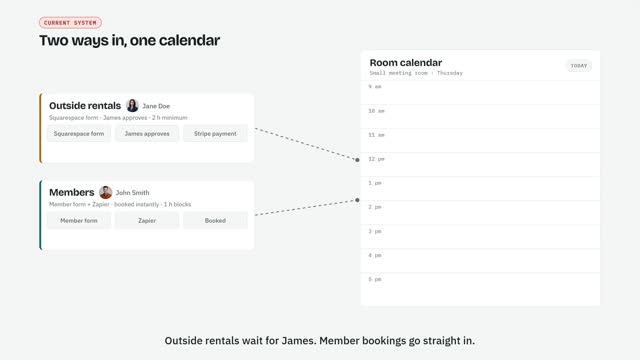
The problem: two doors into one room calendar, and nobody checking. The fix: five small automations, built in order, each from one prompt.
The full video shows all five phases, each with the exact prompt Claude is given. We play it in full on the next slide. We build all five tonight.
Slides and full video · scan to open
 preibisch.biz/presentations/ai-secret-sauce-night-three
Want the handout?
Contact Paul for a copy
604-845-8294 · preibisch.biz
Slides and video live on preibisch.biz/presentations. The handout is by request.
Guard the calendar · the problem
One Room, Two Doors, Nobody Checking
Rentals come in through the website form and wait for payment. Until they pay, nothing is on the calendar.
Members book through Zapier and land on the calendar instantly, without checking it.
So a member can book on top of a rental that hasn't been paid yet.
▶ The whole plan
5 min 48 · click to play full screen
Watch for
The two doors, the double booking, the fix, then the five phases and the prompt for each one.
The fix: a hold goes on the calendar as soon as a rental is approved, and member bookings check the calendar first.
Guard the calendar · the whole plan
Five Phases. We Build All Five Tonight.
1 · Tonight
Protect the calendar
Member bookings check the calendar before they book
2 · Tonight
Rental drafts
Every request gets a hold and a ready-to-send reply
3 · Tonight
Payment
Paid holds become rentals. Unpaid ones expire
4 · Tonight
Member billing
Hours used, overage, a draft invoice to approve
5 · Tonight
Extras
Monday digest, door codes, "who's over their hours?"
Each phase is one Zap: a recipe that starts when something happens, then runs its steps in order. Phase one is the smallest change, and it closes the biggest hole.
Every phase has its prompt and a QR code in your handout.
Guard the calendar · the recipe
What Phase One Does, Step By Step
1 WHEN
A member books a room on the member form
2 CHECK
Look at the room calendar for anything overlapping that time: holds, rentals, other members
3 IF FREE
Book "MEMBER · name", log the hours, confirm with "3 of 4 hours used"
4 IF BUSY
Don't book. Email the member the clash and the next free times, copy you
5 AFTER HOURS
No after-hours access? Alert you, and put "Meet member" on your calendar
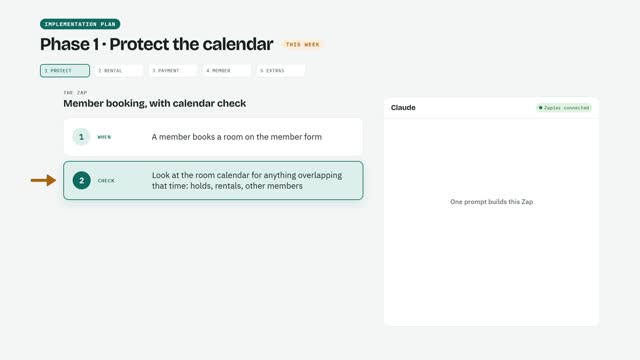
▶ Phase one in the video
1 min · click to play
You don't build this by clicking. You describe it, and Claude builds it in Zapier.
Before we build · connect Zapier
Connect Zapier First
1
In the Claude app open Settings → Connectors and find Zapier
2
Click Connect. A Zapier sign-in page opens. Sign in there, not in Claude
3
Click Allow. Pick the actions Claude may use: calendar, Gmail drafts, Sheets
4
Start a new chat so Claude sees it, then run the test on the right
Then say or paste · looks, changes nothing
Which Zapier tools can you see? List the apps and actions you can use. Don't change anything.
Copy prompt
No key needed
This is a connector (OAuth), so there is no API key to copy. Only if Zapier's connector is missing do we make a Zapier key, and that key goes straight into the safe.
Claude building Zaps needs a Zapier plan that allows it. Check Settings → Billing first.
Guard the calendar · build the Zap
One Prompt Builds It. You See The Plan First.
Build a Zap called "Member booking, with calendar check". When a member books a room, check that room's calendar for anything overlapping. If it's free, book it as "MEMBER · name", log the hours in my booking spreadsheet, and confirm to the member. If it's busy, don't book: email them the clash and the next 3 free times, and copy me. If it's after hours and they don't have after-hours access, email me. Show me the plan first, and leave it switched off.
Copy prompt
No early access to Zapier's AI builder yet?
Walk me through building this Zap in Zapier's editor, one click at a time.
Copy
Claude shows you the plan. Nothing gets built until you say yes.
Guard the calendar · test, then switch on
Try It With Fake Bookings. Then You Say Go.
Say or paste
Test the Zap with two fake member bookings: one at a free time, and one that clashes with something on the calendar. Show me what happened to each, then delete the test bookings.
Copy prompt
It worked if
- The free one was booked and confirmed
- The clash was not booked, and the "member" got the next free times
- The test bookings are gone from the calendar
Then, and only then
Switch the Zap on.
Stamp 1. The gate is guarded.
The calendar is guarded
Ten-Minute Break
After the break: rental requests that fill themselves in.
Phase 2 · Rental drafts · same move, new prompt
Every Rental Request Gets A Hold And A Draft
Build a Zap called "Rental request → draft". When the Squarespace rental form is submitted, check the rules: Mon–Fri 8:30–5 in 2 h blocks, 4 h minimum after hours and weekends, using the Overrides and Clients tabs. If that room is free on the "Cowork Chilliwack Bookings" calendar, add "HOLD · {name}" with the room in Location for 48 hours and re-check for clashes. Have Claude rate the meeting description green, yellow or red. Then create a Gmail draft (never send) with subject tags like [HELD] [AFTER HOURS] [RULE]. Show me the plan first.
Copy prompt
What you check
A fake rental request creates a HOLD on the calendar, and a Gmail draft with the right tags appears. Nothing is sent. You press Send.
Same pattern as phase 1: plan first, fake test, then you say go.
Phases 3 to 5 · who does what
Payment, Billing And The Weekly Digest
3 · Payment · we build it
Stripe link, paid, expiry
A payment link for the exact hours. Paid: the hold becomes a rental. Unpaid after 48 hours: the hold is removed. Needs your Stripe key.
4 · Billing · we set it up together
Zoho overage invoice
Hours over the plan become a draft invoice you approve. First we connect Zoho Billing.
5 · Extras · you build it
Monday digest
Every Monday morning you get the week's after-hours bookings and what each needs. Your turn: you build it on your own.
Page 12 of your handout has all three prompts, each with a QR code. First the Stripe key, then phase 3.
Keys go in the safe. Claude gets the name.
Before phase 3 · get your key
Make A Stripe Key, Straight Into The Safe
1
Open the Stripe Dashboard. Switch on Test mode first, so no real money moves tonight
2
Go to Developers → API keys and choose Create restricted key
3
Name it claude-payment-links. Allow write for Payment Links, Products and Prices, and read for the rest
4
Copy the key and put it straight into your Infisical safe as stripe-test-key. Never into the chat
Then say or paste · names only
I stored a key called stripe-test-key in my safe. Never ask me to paste the value and never print it. Check that it works, and tell me which Stripe account it belongs to and whether it is in test mode.
Copy prompt
Why a restricted key
It can only do the jobs we list. If it ever leaks, it cannot touch your bank details or refund money. When we go live, we make a second key the same way and store it as stripe-live-key.
It worked if Claude names your Stripe account and says test mode.
Phase 3 · Payment · same move, new prompt
Payment Link, Paid, And Hold Expiry
In the rental draft Zap, add a Stripe payment link for the exact hours × the room’s rate (small $25, large $60, studio $100; non-profit small $20, large $48), with the booking ID. Then build “Payment received”: when that link is paid, rename the HOLD to “RENTAL · {name}” and mark the Rentals row paid; if it’s after hours, add “Meet renter” (or “Set door code” for trusted clients) to my calendar. Then build “Hold expiry”: every hour, delete unpaid holds older than 48 hours and draft a reminder at 24 hours.
Copy prompt
Test it with a fake payment
In test mode, pay the link with the test card 4242 4242 4242 4242, any future date, any code. The HOLD should become "RENTAL" and the sheet say paid. Then wait for the hold-expiry check.
Test mode only tonight. Going live comes later, with stripe-live-key.
Before phase 4 · we set it up together
Connect Zoho Billing
1
Sign in to your Zoho Billing account. If you have none, we make a free one now
2
In Zapier, add a Zoho Billing connection and sign in when it asks (a connector, no key)
3
Check one test customer exists in Zoho Billing, with its customer ID
4
If Zapier has no connection for it, make an API client in Zoho, and put its secret straight into the safe
Then say or paste · looks, changes nothing
Look in Zapier for a Zoho Billing connection. If it is not connected, walk me through connecting it one click at a time. Find one test customer and tell me its customer ID. Do not create any invoice.
Copy prompt
It worked if Claude finds the connection and one test customer ID.
Phase 4 · Member billing · drafts only
Overage Becomes A Draft Invoice
Build a Zap called “Overage invoice”. When a row with Status “Ready” is added to the Invoices tab of the Bookings sheet, create a draft invoice in Zoho Billing for that Zoho customer ID: overage hours × $20. Then mark the row “Drafted” and email me a summary. Never send the invoice. Show me the plan and test it with a fake row.
Copy prompt
Test it with a fake row
Add a test row marked "Ready" for your test customer. A draft invoice appears in Zoho Billing, the row says "Drafted", and you get a summary email. Nothing is sent.
Claude never sends an invoice. You approve it.
Phase 5 · Extras · your turn
The Monday Digest: You Build It
Build a Zap that every Monday at 8 am emails me all room bookings for the coming week that fall outside Mon–Fri 8–5, saying for each one whether I need to meet them or set a door code.
Copy prompt
On your own this time
You know the move now: paste, read the plan, fake test, say go. We walk around and help only if you get stuck. Every Monday at 8 am you get the week's after-hours bookings, and what each one needs from you.
Plan first, fake test, then you say go.
Where this is going
Two More Nights, Two More Abilities
Night four · the castle
Move the safe to a server
- Make a Hetzner API key and put it in the safe
- One Claude prompt rents and locks a server
- Install Infisical there, so the safe stays on when your laptop is closed
Night five · the hands
Install Rakazo on the server
- Some sites have no connector and no API key
- Rakazo lets Claude log in and act on your behalf, like a person at a keyboard
- Logins stay in the safe, never in the chat
Tonight: the connectors you can click. Next: a server that never sleeps. After: hands for the sites that have no door.
Each night adds one ability to Claude.
Before night four
Four Small Jobs For This Week
1
Let all five Zaps run for a week. Check each one with a real booking.
2
Note any booking they got wrong, and bring it to night four.
3
Any key you use goes straight into the safe. Tell Claude the name only.
4
Have your Hetzner login ready for night four.
Pick one repetitive task in your own business to automate next.
Before you close the laptop
One Last Ask
Write a plain-English journal entry of what we did tonight, including anything still not finished.
Copy prompt
Sept 28 · Night One
Oct 5 · Night Two: the safe
Oct 13 · Night Three: Claude drives
Night Four: the castle
Night Five: the hands (Rakazo)
Paul Preibisch · 604-845-8294 · preibisch.biz
Before anyone leaves
Did We Do Everything?
Saw why every app is its own maze, and Claude as the commander
Know a connector (OAuth) from an API key
Know why keys live in the safe, and why Infisical
Connected Zapier and ran the test
Connected Google Calendar, Gmail and Drive
Watched the video
Phase 1: member booking checks the calendar, tested, switched on
Phase 2: rental requests get a hold and a draft
Stripe key in the safe, test mode confirmed
Phase 3: payment link, paid, hold expiry
Zoho Billing connected
Phase 4: overage invoice draft
Journal entry written
Click a box to tick it. Anything unticked is tonight's homework.
Next time · night four
The Castle: A Server That Never Sleeps
1
Make a Hetzner API key and put it straight into the safe
2
One Claude prompt rents a small server in Hetzner, after asking you the price
3
Claude locks it down: your key only, a firewall, automatic updates
4
A private tunnel with Tailscale, so only your devices can reach it
5
Move Infisical onto the server, so the safe stays on when your laptop is closed
6
The test: close the laptop lid, open the safe on your phone
Bring
Your Hetzner login ready. Your laptop on the charger. Nothing else.
After that: night five, Rakazo, hands for sites with no API.