
Contents
I’ve been interested in AI for a long time, and I’ve been exploring virtual worlds since I first set foot in Second Life in 2006. These two interests have always lived in separate boxes in my head. AI was the fast-moving research thing. Second Life was the creative space I kept coming back to because there’s nothing quite like it — a twenty-year-old virtual world where you can build almost anything and share it with people from all over the planet who genuinely care about what they made.
This year I started pulling those two boxes together. I built a fleet of AI bots, gave them voices and personalities, deployed them at a virtual language school. I wrote about some of that work in an earlier post about the Virtlantis demo and the underlying architecture. But there was one thing that kept bothering me: the bots could talk, but they couldn’t really move. They teleported. They stood in place. Compared to the conversational intelligence I’d built into them, their spatial behavior was embarrassingly dumb.
So I set out to fix that. What followed was a single day of building — with Claude Code, which I’d previously trained on the entire LSL scripting library. That’s worth saying plainly: the system I’m about to describe, from the LSL prim scanner to the A* pathfinder to the dashboard tab, was built in one session. The ideas are mine, the architecture is mine, but the implementation speed only makes sense if you understand that I had an AI pair programmer that already knew every corner of the LSL API. What might have taken weeks of documentation-reading and trial-and-error compressed into hours of iteration. The problems being solved are the same ones game designers have been tackling professionally for forty years. The tools available to do it are new.
The LSL scripts that power the waypoint prims — the touch handlers, the webhook calls that register each prim’s position with the server — were written by Claude Code and delivered directly to my avatar’s inventory without me ever touching the viewer’s script editor. If that pipeline interests you, I wrote about it separately: I Taught Claude Code to Write LSL and Hand-Deliver Scripts to My Avatar.
Watch the demo — digital twin viewer, waypoint graph, and A* pathfinding in the bot dashboard
What AI says about pathfinding algorithms ›
The problem no one talks about
When you play a modern video game and an NPC walks down a hallway, avoids the furniture, finds a path around the broken wall — you don’t think about it. It just works. Behind that seamless experience is usually a navigation mesh (navmesh), a precomputed map of where in a 3D space a character can walk. The game engine figures this out at build time, stores it as a polygon mesh, and the pathfinding algorithm runs against it at runtime.
Second Life doesn’t give you that. There’s no navmesh. There’s no collision API that tells an external script “here are the surfaces Barry can walk on.” You’re working with a virtual world built by its residents over two decades, and the terrain and objects are a complex, irregular geometry that no automatic tool can cleanly map.
This is the core challenge of building intelligent spatial behavior for Second Life bots. The bots don’t know anything about the space they’re standing in. They can teleport to a coordinate. They can use AutoPilot to walk to a nearby point. But they have no model of what’s in between, what they can walk around, what they can’t, what path makes sense as a route versus a straight-line stumble that clips through a wall.
The standard game AI answer to this — the one that’s been working since Quake — is the waypoint graph. Before navmeshes became cheap enough to compute automatically, game designers placed waypoints by hand. You’d walk through your level and drop breadcrumbs: here’s a node, here’s another node 2 meters away, here’s the connection between them. The AI pathfinder then had a graph it could reason about. It wasn’t perfect, but it worked, and it scaled.
That’s what I built.
Background: why A* and not something simpler
If you haven’t thought much about pathfinding algorithms, the problem sounds easy: given a start node and an end node in a graph, find the shortest path between them. And it is easy if you don’t care about performance. Dijkstra’s algorithm solves it correctly every time. The issue is that Dijkstra explores all directions equally — it fans out like a flood fill, checking every possible route before converging on the best one. On a graph with 644 nodes and 2,483 edges, that’s a lot of work you’re doing for paths that go the wrong direction.
A* (pronounced “A star”) adds a heuristic: at every step, it prefers to expand toward nodes that are already close to the target. The heuristic I used was straight-line Euclidean distance — how far in 3D space is this node from the destination, regardless of what paths exist. This heuristic is admissible (it never overestimates the true distance) which guarantees A* will still find the optimal path, but it converges much faster because it focuses its search in the right direction.
The result: on my 644-node graph, A* found a 40-hop path covering 57.6 meters in under a second on the server. Dijkstra would have gotten there too, but would have wasted time exploring the wrong end of the sim.
For anyone reading this who’s never implemented A*: it’s about 40 lines of Python once you have your graph in a usable data structure. The algorithm is not the hard part. The graph is the hard part.
Building the graph: shift-drag and adjacency
A waypoint in this system is simple: a position in 3D space (x, y, z in Second Life coordinates), an owner (which project or sim region it belongs to), and a UUID. That’s it. Three things. The complexity isn’t in what a waypoint is, it’s in how they connect.
I considered a few approaches:
- Radius-based connectivity: connect any two waypoints within N meters of each other
- k-nearest neighbor: connect each waypoint to its K closest neighbors
- Adjacency-only: connect only waypoints that are very close together, treating each pair as a single “step”
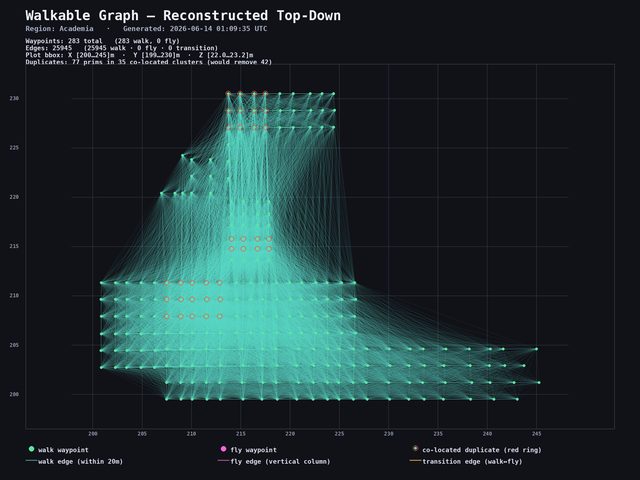
The radius approach sounds attractive but produces what I started calling the hairball problem. With 644 waypoints and a 5-meter connection radius, you get 25,945 edges. That sounds like more connectivity, but it’s actually worse for navigation: a bot following that graph would skip over intermediate nodes, jump across obstacles, and take paths that look correct on the graph but don’t correspond to walkable routes in the world.
The original test: every waypoint connected to every other within a 5-metre radius. 25,945 edges — looks comprehensive, completely useless for real navigation. Click to enlarge.
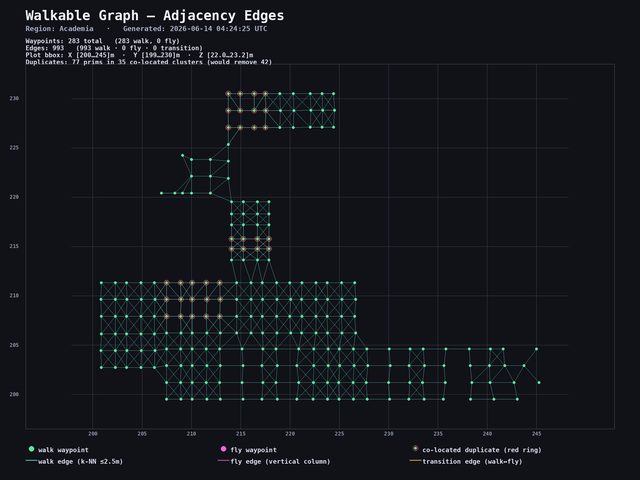
The adjacency approach — with a 2.5-meter maximum distance per edge — gave me 2,483 edges on the same 644 nodes. Every hop is a real step. A bot walking the graph moves through the space the way a human would, because each edge represents a short move that a human placed deliberately.
The improved graph — adjacency-only edges at max 2.5m. 2,483 edges that trace real walkable paths. Click to enlarge.
The placement workflow matters here. My process was:
- Rez a “master” waypoint prim in Second Life (a small sphere with a touch menu)
- Shift-drag it to create a copy at a new location
- Move that copy to the exact position you want the next waypoint
- Shift-drag again from the new one to continue the chain
The critical rule: you have to physically move each new copy before shift-dragging again. If you shift-drag from the same source twice, both copies land in the same position and you get a pile of coincident prims — lots of waypoints, none of them useful. I learned this the hard way when I discovered 644 of my waypoints were all stacked on each other at a single location and had to start over.
Each prim, when touched, calls a webhook back to my server with its position. The server stores the position, deduplicates by rounding to centimeter precision (because SL coordinates have floating-point noise), and computes edges by checking all pairs of stored waypoints against the 2.5-meter adjacency cap.
The result of a few hours of shift-dragging across a 45×45 meter plot: 644 unique waypoints, 2,483 walk edges, and a graph that actually maps the geography of the space.
Want AI bots for your Second Life sim?
I build voiced, scripted AI avatars for sims, events, and educational spaces — characters with real personalities, spatial awareness, and in-world behavior. If you're curious what this could look like in your space, get in touch.
Explore the SL AI service →
The disconnected component problem
Here’s a practical gotcha that trips people up: your waypoints can end up as isolated islands with no connections between them. Think of it like dropping waypoints on both sides of a wall but forgetting to place any along the ramp that connects them. The pathfinder has no idea the ramp exists — it only knows what you placed. If a bot’s destination sits on an island it can’t reach, it just won’t move.
My graph had 14 disconnected components. The main component had 594 waypoints — basically the whole sim. Then there were smaller orphan clusters: 12 nodes here, 11 there, a few singletons. These happened because I missed a gap when I was laying the waypoints down. There was a 3-meter stretch between two clusters where the adjacency cap couldn’t bridge them.
The pathfinder returns "no walkable path to target" for any target in a disconnected cluster, and the bot doesn’t move. That’s actually the correct behavior — better to fail clearly than to teleport or get stuck trying. But it means the placement pass needs to be thorough, and it means having a way to see the disconnected components is important.
Which is where the 3D viewer comes in.
A digital twin of the Second Life environment
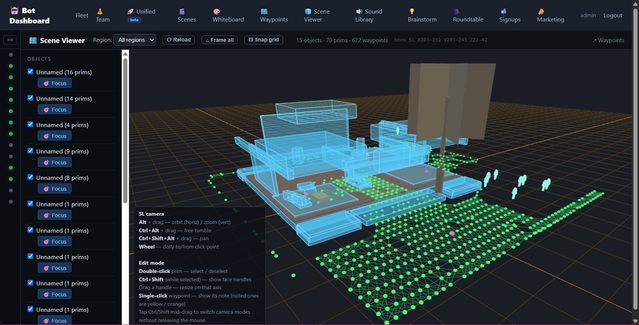
The second piece of this project was a 3D spatial viewer — a browser-based map of what’s in the sim so I can see the waypoint graph in context.
The LSL scanner is a script I drop into a linkset I own. It uses llGetLinkPrimitiveParams to read position, rotation, and scale for each prim and streams the data to my server in chunks. On the viewer side, everything gets rendered as a plain box — mesh objects, sculpts, everything. It doesn’t represent the actual shape of anything. It’s more like a rough block diagram of where things are and roughly how big they are. Useful enough to spot a gap in your waypoint coverage or figure out why a bot is getting confused in a corner, but don’t expect an accurate replica of your build.
Honestly, it doesn’t work perfectly — it’s experimental. I dropped the scanner script into a building linkset to test it, and what I got back was a collection of boxes that gave me a general sense of the space. That’s all I needed: a way to see the waypoint graph in relation to the obstacles around it.
The camera controls mirror Second Life’s viewer — Alt+click to orbit, Ctrl to pan — so if you’re an SL builder, it feels familiar. The waypoint graph overlays on top: walk edges as white lines, fly edges in blue, transition edges (stairs, teleports) in orange. Lines draw through geometry rather than being hidden behind it, which is the whole point when you’re looking at a building interior.
Live avatar positions poll every 2 seconds. Each bot shows up as a dot so you can see at a glance where Barry is on the map relative to his next waypoint.
The 3D viewer tab in the bot dashboard — rough box representations of sim objects with the waypoint graph overlaid. Good enough to spot gaps; not a precise replica of anything. Click to enlarge.
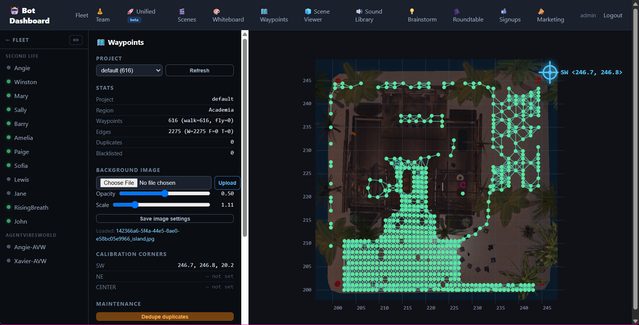
The dashboard also has a dedicated waypoints tab where I can load a background image of my sim, see the waypoint graph plotted on top of it, delete duplicates in bulk, and save updated graphs — all without touching the server directly.
The waypoint dashboard tab — upload a background image of your sim, see the graph plotted on top, delete duplicate waypoints, save new graphs. Click to enlarge.
Barry walks the grid
The first time the whole system worked end to end, I was watching the dashboard chat panel on one screen and the sim on another.
I asked the server to send Barry to a named waypoint on the far side of the plot. The A* algorithm ran in under a second and returned a 40-hop path: 57.6 meters, diagonal across the grid, avoiding the gap where I’d missed the placement. The server spawned a background task for Barry, which walked each hop using SL’s AutoPilot: llMoveToTarget(position, tau) with a sleep based on distance / 3.0 m/s + 0.4s buffer time to let AutoPilot complete before the next call.
In the chat panel, messages scrolled down:
[BARRY] Walking to walk-waypoint-7b1b8a (step 1/40)
[BARRY] step 2/40 at walk-waypoint-b717c4
[BARRY] step 3/40 at walk-waypoint-f3229a
...
It took about 45 seconds for Barry to cross the plot. Each hop was under 2.5 meters. He traced a real path — sometimes straight, sometimes diagonal when the grid allowed — from one end to the other. Twice he doubled back because the only unvisited neighbor was the node he’d just come from. That’s an artifact of random walk, not A*: I was testing both modes.
This sounds simple. It felt significant. A bot that can go to a place, rather than just teleport near a coordinate, is a completely different kind of entity.
What this makes possible
The use cases I’ve been thinking about:
Tour guides. A bot that walks a visitor through a space, stopping at named waypoints and delivering context about each area. Right now I have this working as a “walk path” command with a named sequence of waypoints. The bot moves, pauses, speaks, moves again.
Patrols. A guard, a greeter, a shopkeeper who wanders. The loop mode walks a closed path indefinitely, restarting from the beginning when it reaches the end. Randomized walk mode produces more natural wandering behavior at the cost of predictability.
A→B navigation. Send a bot to meet an avatar, guide someone to a location, have a character “come over here.” This is the core A* use case. It works now. The bot finds the shortest walkable path and follows it.
Spatial scaffolding for AI conversations. This is the one that interests me most from a research angle. When a bot’s AI brain generates a response, it currently has no idea where it is in the world. If you give it a spatial context block — “you are currently near the north entrance of the garden, 8 meters from the fountain, 12 meters from the library” — it can reference that in conversation. “Would you like to walk over to the library?” becomes a real offer, not a fiction, because the bot actually can.
Vehicle or creature movement. The same graph that works for humanoid bots works for any entity that moves through the space. A drone, a dragon, a delivery cart. AutoPilot drives whatever you attach it to.
On the Second Life community and what this is not
I want to be direct about something, because the SL community has reasonable concerns about AI and I don’t want to skate past them.
I’ve written about the backlash in more depth in the Virtlantis post, so I won’t repeat all of it here. The short version: there are legitimate worries about AI systems that scrape content, impersonate residents, or displace the creativity and labor that has kept this world alive for twenty years.
This is none of that. Everything here runs on my own parcel or in sims I’ve been invited into. The bots are on my land. The waypoints are my own prims. The 3D scanner only touches linksets I own — and to be clear, what it produces is a rough box diagram, not anything useful for extracting someone’s build. I’m not sharing these tools publicly; right now this is all experimental. When I do share something, I’m deliberate about what and with whom.
My background is software development. I taught English in Korea years ago and I still love teaching — but I’m a developer first, and this is a developer project. The reason I’m in Second Life at all right now is partly because I’m curious how far AI can go in a virtual world with real constraints, and partly because I want to do something interesting for Kip Yellowjacket’s Virtlantis relaunch. Kip built something that mattered to a lot of educators and it’s worth showing up for.
I understand why people are worried about AI in SL. The tools I’m building are capable enough that intent matters. My intent is to experiment, to build things that are genuinely useful in contexts I care about, and not to cause harm to a community I’ve been part of since 2006.
What I’d do differently
A few things I got wrong that are worth noting for anyone who tries to build this:
The shift-drag workflow has a failure mode that’s invisible until you query the database. You can spend an hour placing waypoints and end up with 644 of them stacked at the same coordinate because you forgot to physically move each copy before dragging the next one. I’d add a visual indicator — maybe the prim changes color when it’s in a position that already has a nearby waypoint — to prevent this.
The 14 disconnected components were detectable before I started walking bots. Once I had the 3D viewer, I could see the gap in the graph. Before the viewer existed, I found the components by running a depth-first search from every unvisited node and counting how many I reached. The algorithm told me there were 14 islands; the viewer showed me where they were so I could fix them. Both are necessary. Don’t build the algorithm without building the visualization.
Per-hop sleep math needs tuning. distance / 3.0 + 0.4 works for flat ground. Stairs take longer. Slopes take longer. A bot that rushes the next hop before AutoPilot finishes the previous one ends up standing still in a confused state. I’ve added a safety margin, but a proper solution would be position polling — check that Barry actually arrived at the waypoint coordinate before moving on — rather than time estimation.
The thing I keep coming back to
Game designers figured most of this out between 1995 and 2005. Quake had waypoint bots. Half-Life had nav meshes. The problems I’m solving are not new problems. What’s new is that I’m solving them in a virtual world I didn’t design, with a scripting language (LSL) that has serious performance and latency constraints, talking to AI backends that can have real conversations, and deploying bots that real visitors encounter in real time.
Second Life is not a game engine. It’s a creative space that’s been shaped by its community for two decades, and the geography reflects that — irregular, layered, built by different people with different tools at different times. Every game AI textbook assumes you control the environment. Here, you don’t. You have to map it by hand and work with what’s there.
That’s actually what makes it interesting to me. The constraints are real. The solutions have to be practical. And when Barry walks 40 hops across the plot and arrives at the waypoint you sent him to, it feels less like a demo and more like something that might actually be useful.
A note on how this post was written: I fed my Claude Code session transcript — the actual live chat where this system was built — along with the codebase itself into an AI, asked it to match the tone of my other blog posts, and then edited it myself. The technical details are accurate because they came directly from the code and the conversation that produced it. The opinions and the voice are mine. I wrote and edited this post personally; the AI handled the first draft.
Related reading
- I Taught Claude Code to Write LSL and Hand-Deliver Scripts to My Avatar — the pipeline that wrote the waypoint prim scripts: Claude Code trained on LSL, a signing relay, and two API calls that drop a finished script into your avatar’s inventory
- I Gave Second Life Bots a Brain, a Voice, and a Soul — the full architecture: SecondBot, Hermes, the bot fleet, and the security model
- Notes from Virtlantis: AI Bots, Voice, and the Teacher as Puppet Master — four AI avatars, one dashboard, and what the SL community backlash is really about
- I Built a Guided Meditation Bot in Second Life — a shaman avatar with LSL scripting and voice streaming
- Agent Vibes: Finally, Your AI Agents Can Talk Back — the open-source TTS layer that powers voice across the bot fleet
Did this genuinely help you?
I also wrote about this on LinkedIn — Orchestrating AI in Second Life. If this post gave you something useful, a like or share goes a long way — it's how this work reaches people who'd actually use it.
Like & share on LinkedIn →Building AI bots for Second Life?
I offer a full setup service — intelligent speaking avatars with pathfinding, brain backends, and voice, deployed on your sim. Everything described here, configured for your space and your use case.
Comments
Loading comments…
Leave a comment