
Contents
If you’re using Claude Code for real work, you’ve probably hit this moment: you want to run two agents at once. One refactoring a module while another reviews the diff. Or one writing tests while another’s building the feature. Tabs feel clunky. Separate terminal windows feel worse.
This is the post I wish I’d found when I hit that wall.
The answer is tmux. And most people are sleeping on it.
What tmux is, in 30 seconds
tmux is a terminal multiplexer. Three things it does that matter:
- Persistent sessions. Start a long Claude session, close your SSH connection, reconnect tomorrow — it’s all still there. Nothing dies because your laptop went to sleep.
- Split panes. One terminal window becomes a grid: agent here, dev server there, logs in the corner.
- Detach / reattach from anywhere. Phone, tablet, different machine — same session.
The 6 commands you actually need
Everything in tmux starts with a prefix key (Ctrl-b by default). Press it, let go, then press another key.
tmux new -s work     # start a new session called "work"
tmux attach -t work  # reattach after disconnect

Ctrl-b "             # split pane horizontally
Ctrl-b %             # split pane vertically
Ctrl-b <arrow>       # move between panes
Ctrl-b z             # zoom into current pane (toggle)
Ctrl-b d             # detach (session keeps running)
Ctrl-b x             # close pane
Put four Claude Code sessions in one window. Detach. Walk away. Come back from your phone and they’re all still running.
The problem nobody warns you about
Within about ten minutes of running multiple sessions, you have no idea which pane is which.
The dev server. The logs. The Claude that’s refactoring auth. The Claude that’s reviewing a PR. They all look the same. Default tmux pane borders are anonymous lines — no label, no hint. You squint, you zoom in to check, you tab away, you forget.
This is the “pain in tmux” people complain about. It’s real. And it’s completely fixable.
Want to go deeper with Claude Code?
I run 1-on-1 Zoom coaching sessions for developers and non-developers who want to build real things with AI — from your first project to shipping actual tools. Hands-on, project-based, no fluff.
Book a coaching session →
The fix: pane titles, automatically
Every tmux pane has a pane_title attribute. Programs can set it with one escape sequence:
printf '\033]2;my pane name\007'
tmux doesn’t display it by default. We turn it on, then wire up two things:
- Shell auto-titling — idle panes show the current directory; active panes show the running command.
- Claude Code hook — every time you submit a prompt, the pane title becomes that prompt. Live readout of what you just asked the agent to do.
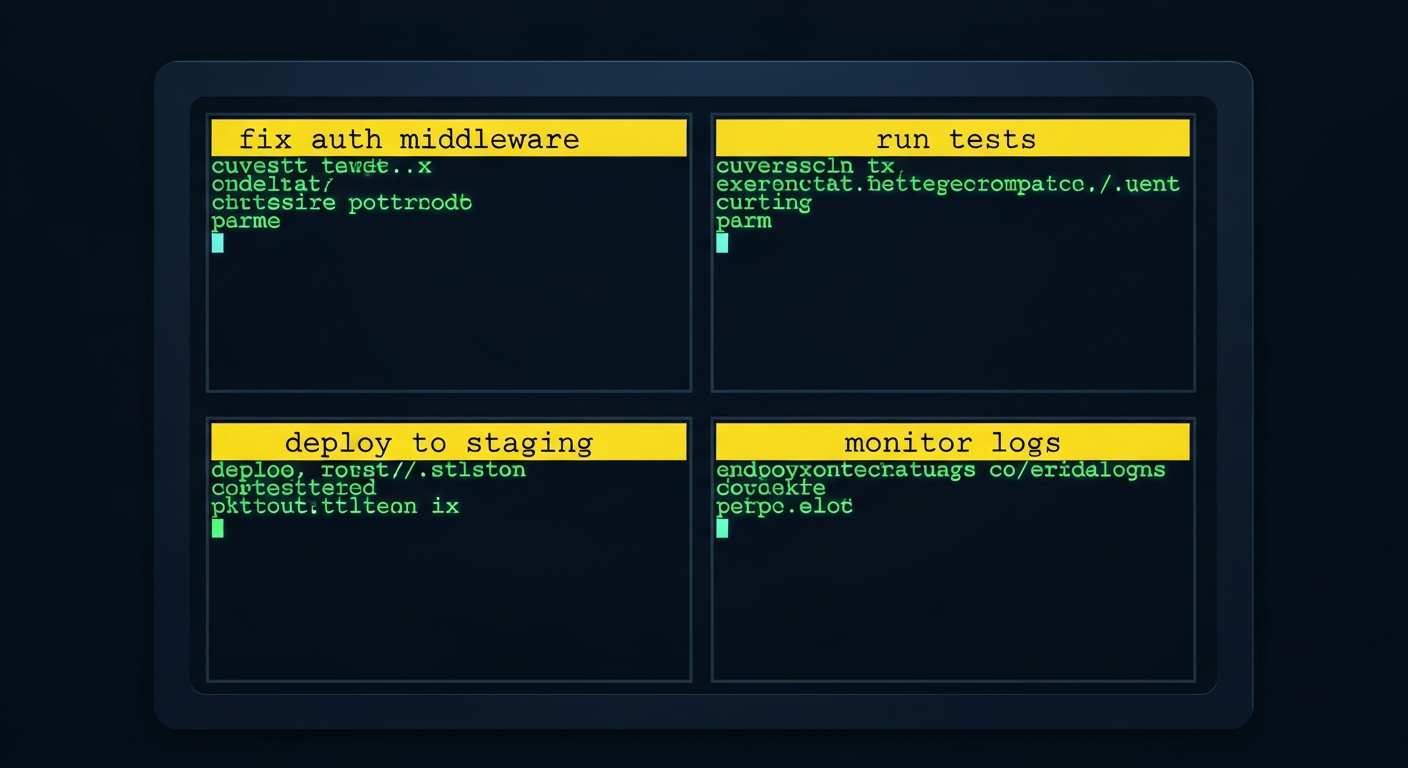
The result: every pane wears a yellow label in its top border. The Claude pane you just asked to “fix the auth middleware” literally says fix the auth middleware. The shell pane in ~/projects/api says api, and flips to api ❯ pytest while tests run. Glance, know.
Set it up
The setup is four files: a tmux config tweak, a zsh config tweak, a hook script, and a settings.json entry. Paste this block into Claude Code — it’ll handle all of it, idempotently:
Set up automatic tmux pane labeling for me. Make these changes idempotently — re-running is safe.

1) Append these lines to ~/.tmux.conf if they aren't already there:

   set -g pane-border-status top
   set -g pane-border-format "#[fg=yellow,bg=colour19,bold] #{?pane_title,#{pane_title},#{pane_current_command}} #[default]"
   bind T command-prompt -p "Pane title:" "select-pane -T '%%'"

2) Append this block to ~/.zshrc (only if not already present):

   if [[ -n "$TMUX" ]]; then
     ZSH_THEME_TERM_TITLE_IDLE='%1~'
     ZSH_THEME_TERM_TITLE_CMD='%1~ ❯ %2'
   fi

3) Create ~/.claude/hooks/pane-title-from-prompt.sh with this content, then chmod +x it:

   #!/usr/bin/env bash
   set -eo pipefail
   export LC_ALL=C
   [ -n "$TMUX" ] || exit 0
   command -v tmux >/dev/null 2>&1 || exit 0
   input="$(cat)"
   prompt="$(printf '%s' "$input" | jq -r '.prompt // .user_input // ""' 2>/dev/null)"
   [ -n "$prompt" ] || exit 0
   summary="$(printf '%s' "$prompt" | head -n 1 | tr -d '\r\n\t' \
     | sed -E 's/[[:cntrl:]]//g; s/[[:space:]]+/ /g; s/^ //; s/ $//' | cut -c1-60)"
   [ -n "$summary" ] || exit 0
   if [ -n "$TMUX_PANE" ]; then
     tmux select-pane -t "$TMUX_PANE" -T "$summary" 2>/dev/null || true
   else
     tmux select-pane -T "$summary" 2>/dev/null || true
   fi
   exit 0

4) Edit ~/.claude/settings.json to add a UserPromptSubmit hook that runs the script. Merge into the existing "hooks" object:

   "UserPromptSubmit": [
     {
       "hooks": [
         { "type": "command", "command": "bash \"$HOME/.claude/hooks/pane-title-from-prompt.sh\"" }
       ]
     }
   ]

5) Reload tmux: tmux source-file ~/.tmux.conf

6) Tell me to restart Claude Code so the new hook is picked up.

When done, confirm each step and show me the final ~/.tmux.conf and the relevant section of ~/.claude/settings.json.
What you get
- Auto-labels on every pane. Shell panes show cwd + running command. Claude panes show your last prompt.
- Manual override:
Ctrl-b T, type a name, Enter. - Color tuning: swap
colour19forcolour17(deeper navy) or any of tmux’s 256 colors.
One grid. Four agents. Every pane tells you exactly what it’s doing. That’s the setup.
Comments
Loading comments…
Leave a comment