

Contents
Here’s how I actually work: multiple PowerShell tabs open at all times, each with up to four Tmux panes inside it. Each pane is Claude Code running on a different project — or a different agent within the same project. At any given moment I’m context-switching between maybe a dozen active agents across several codebases, all running on a remote server, all in parallel.
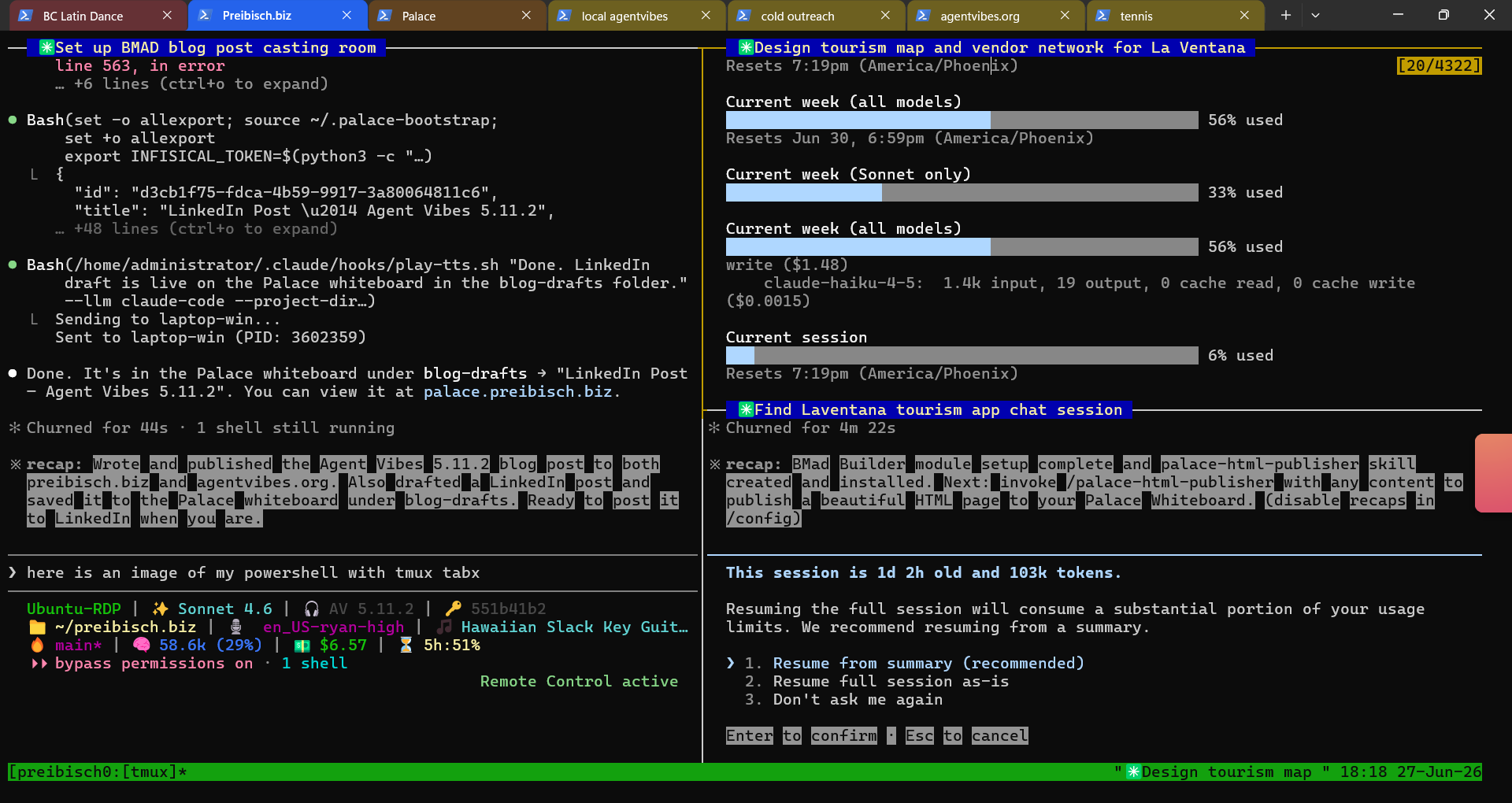
The problem isn’t one terminal. It’s twelve. When you’re working that way, you can’t babysit any single agent. You’re already somewhere else. You flip back, scan the output, hope it’s done, flip away again.
That’s the problem Agent Vibes solves. It’s an open-source tool that gives your AI coding agents a real spoken voice. When an agent starts a task, you hear it. When it finishes, you hear that too — out loud, through your speakers, while you’re working on something else entirely. No babysitting the terminal. No alt-tabbing. You just work and listen.
If you’re running multiple agents at once (which is exactly what BMAD party mode enables), Agent Vibes takes it further: each agent gets its own distinct voice. The architect sounds like one person, the developer like another, the QA engineer like a third. You know who’s talking without reading a single header.
And if you’re developing on a remote server — which I do, and increasingly recommend — Agent Vibes has a Remote Receiver that pipes the audio from your voiceless server through an SSH tunnel and plays it on your local laptop speakers. The work runs on the box. The voice arrives at your desk.
Version 5.11 is a significant upgrade to the voice quality side of that picture. Two new neural providers, a rebuilt audio effects stack, and a cleaned-up Voices tab.
What’s New in 5.11
Kokoro: Neural TTS That Runs on Your CPU
The first new provider is Kokoro, and the headline is that it runs locally with no GPU. If you’ve tried local neural TTS before and written it off because the quality wasn’t there or you needed dedicated hardware, Kokoro is worth another look.
It’s a genuinely human-sounding voice engine — noticeably better than Piper’s offline quality — and it runs entirely on your machine with no API key and no usage limits. After the initial download, it works offline.
What makes it unusual beyond the quality: Chinese, Japanese, and Korean support is built in. Each CJK language requires its own language pack. The installer walks you through it with a real pip progress bar (not a spinner that makes you wonder if anything’s happening), and the Kokoro picker shows which packs you have and lets you preview CJK voices before committing to a download.
A few details in the experience that are worth knowing: there’s a readiness cue — a small audio ping — when Kokoro finishes loading and is ready to synthesize, so you know exactly when you can start. If you’re SSH’d into a remote server, voice previews in the Kokoro picker route through your connection just like every other provider.
One important note for 5.11 users: if you installed Kokoro with 5.11.0 or 5.11.1 and got silence, the 5.11.2 patch fixes a PEP 668 compatibility issue with newer Python environments. Run npx agentvibes update and reinstall Kokoro.
ElevenLabs: The Premium Cloud Option
ElevenLabs is the other end of the spectrum. It’s a cloud service, it requires an API key, and it costs money. It’s also the most human-sounding TTS I’ve heard from any provider.
The integration in 5.11 is clean: there’s a new API key dialog in the Setup tab. Enter it once, and from there you select ElevenLabs as your provider for any LLM and browse their voices in the same Voices tab you already use for Piper and Kokoro.
Both Kokoro and ElevenLabs work with the Windows SSH Receiver, so the remote audio pipeline that works for Piper now works for neural voices too.
Using Claude Code for serious work?
I run 1-on-1 sessions for developers and builders who want to get more out of AI-assisted development — Agent Vibes, BMAD party mode, remote server setups, the whole workflow. Hands-on and project-based.
Book a session →
Stacked Audio Effects
The effects system got a meaningful upgrade. Previously you picked a reverb level — off, light, medium, heavy, cathedral — and that was your one knob. In 5.11, effects are combinable: you can stack reverb, echo, and chorus on any voice and preview the result live before saving it.
Light reverb plus a short echo gives an agent voice that sounds like it’s coming from a focused workspace. Medium reverb plus chorus creates something more spacious. Cathedral plus echo is genuinely distinctive in a way that’s hard to describe in text — try it on your most authoritative agent and see if it changes how the session feels.
The effects picker now shows a live preview on each item row so you hear what you’re configuring before you commit. This matters most when you’re setting up BMAD party mode with multiple agents — sound is how you tell them apart when you’re not watching the screen, and the effects combinations make that differentiation much richer than voice alone.
Provider-Aware BMAD Auto-Assign
If you’re running a full BMAD multi-agent team, auto-assign now knows which provider you’re using. Previously the behavior was calibrated for Piper voices. Now if you switch to Kokoro or ElevenLabs, the BMAD tab offers voices from that provider when you hit auto-assign — so your whole team stays on the same quality tier rather than ending up with a mix.
If you’re using BMAD and Agent Vibes together and haven’t set up per-agent voices yet, the original Agent Vibes post covers how the BMAD tab works and what the experience is like when 12 agents each have their own voice.
Voices Tab: Cleaner Keystroke Interface
The Voices tab dropped the thumbs-up/thumbs-down buttons in favor of a single favorite star you toggle with a keystroke. Everything is now keyboard-driven: browse with arrows, preview with Space, star a favorite, select with Enter.
Less on screen, faster once you know the keys. If you’re doing an initial setup pass through 900+ voices, the old button-click approach was genuinely slow. The keystroke interface moves faster and feels more like a proper terminal tool.
Which Provider Should You Start With?
If you’re new to Agent Vibes, here’s the honest breakdown:
Piper is the free starting point — 900+ offline voices, no API key, works everywhere. It’s what the original Agent Vibes was built around and it’s still the right choice for most people.
Kokoro is the free neural upgrade. If you want noticeably better voice quality without paying for cloud API calls, and you don’t mind a one-time local download, this is the move. The CPU-only requirement means it works on any modern machine.
ElevenLabs is for when voice quality is actually important — a demo, a recording, something where “good enough” isn’t enough. It’s the most human-sounding option and the only one with a usage cost.
You can switch providers any time from the Setup tab, and different LLMs can use different providers, so you’re not locked into a single choice.
Getting Started
If you already have Agent Vibes installed:
npx agentvibes update
If you’re starting fresh:
npx agentvibes install
The installer walks you through provider selection, voice browsing, and — if you’re using BMAD — per-agent voice assignment. If you’re developing on a remote server, the setup guide for the Remote Receiver is in the docs.
Source is at github.com/paulpreibisch/AgentVibes. Apache 2.0, actively maintained.
Haven’t tried Agent Vibes yet? The full introduction — how the remote receiver works, what BMAD party mode sounds like with 12 agents each speaking differently, and how to install it in under a minute — is here: Agent Vibes: Finally, Your AI Agents Can Talk Back.
Found this useful?
If Agent Vibes is part of your workflow, a share goes further than you'd expect for an open source project trying to reach the right people.
Connect on LinkedIn →
Comments
Loading comments…
Leave a comment